Insights
DeepSeek API Pricing
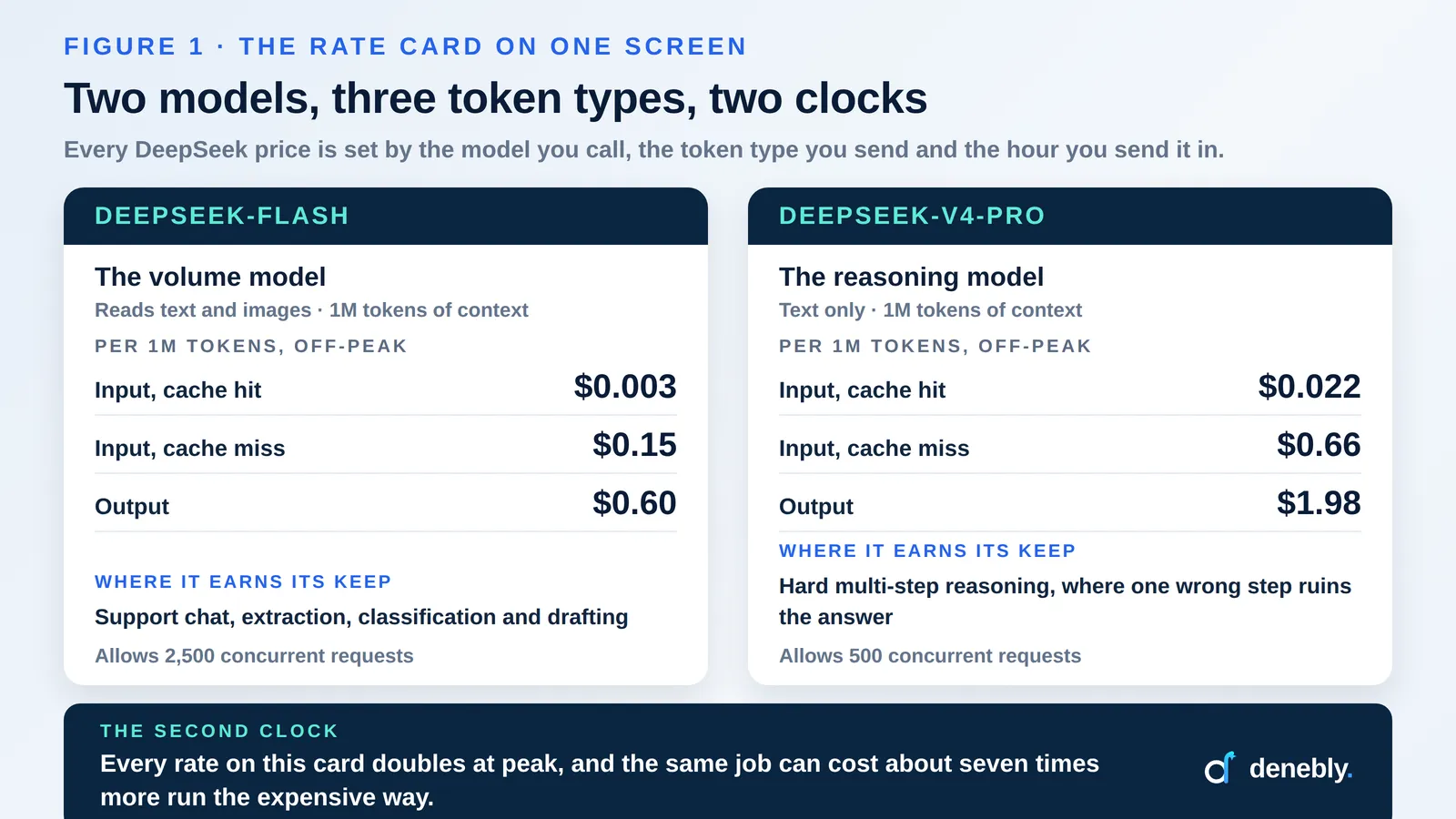
DeepSeek API pricing looks simple on the rate card and confusing on the first bill. Two models, three token types and two clocks decide what you pay, and the gap between the cheapest and the most expensive way to run the same job is about seven times.
DeepSeek API pricing runs on two models. deepseek-flash costs $0.15 per 1M cache miss input tokens off-peak and $0.60 per 1M output tokens, with peak rates exactly double. deepseek-v4-pro costs $0.66 and $1.98 off-peak. Cached input drops as low as $0.003 per 1M tokens.
Every price on this page was read from DeepSeek’s own pricing documentation on November 11, 2026. Every worked example shows its assumptions, so you can rerun the same arithmetic with your own token counts and get your own number.
If you would rather have the model choice and the cost controls built into the product from the start, that is the work behind our LLM integration and fine-tuning services. Bring the job the model has to do, and let’s discuss your project with real numbers on the table.
The Official DeepSeek API Pricing, Model by Model
DeepSeek sells API access to two models today. This is the complete rate card, per 1M tokens, in US dollars, exactly as published on the official pricing page.
| Rate per 1M tokens | deepseek-flash, off-peak | deepseek-flash, peak | deepseek-v4-pro, off-peak | deepseek-v4-pro, peak |
|---|---|---|---|---|
| Input, cache hit | $0.003 | $0.006 | $0.022 | $0.044 |
| Input, cache miss | $0.15 | $0.30 | $0.66 | $1.32 |
| Output | $0.60 | $1.20 | $1.98 | $3.96 |
What you get with deepseek-flash
deepseek-flash is the volume model, served by the model version DeepSeek-V4.1-Flash-1017. Input starts at $0.003 per 1M tokens when the text is already cached and the hour is off-peak, and output tops out at $1.20 per 1M tokens at peak. It reads images as well as text, holds 1M tokens of context, allows up to 384K tokens of output, and accepts 2,500 concurrent requests. Support chat, extraction, classification and drafting normally run on this model.
What you get with deepseek-v4-pro
deepseek-v4-pro, served by DeepSeek-V4-Pro-0813, is the reasoning model. Its off-peak rates are $0.022 per 1M cached input tokens, $0.66 per 1M fresh input tokens and $1.98 per 1M output tokens, and every figure doubles at peak. It matches Flash on context and output limits, but it takes text only, with no vision input, and its concurrency limit is 500 requests. The premium buys harder reasoning, not more room.
The two per-request tools, Search and Fetch
Two tools sit beside the models and bill per request instead of per token. The Search API and the Fetch API each cost $0.75 per 1,000 successful requests on the official card. A research agent making 10,000 searches a month adds $7.50 before a single token is counted. That is small money, but it belongs in the estimate from the start, not as a surprise line later.
How One Request Becomes a Charge
Understanding deepseek api pricing starts with seeing that a single request is not billed as one block of text. It is split into three parts, and each part has its own rate.
The three token types on every bill
The first part is the repeated opening of your prompt, the system instructions, product facts and policy text you send with every request. When that opening matches text DeepSeek has already processed, it bills as a cache hit at the lowest rate on the card. The second part is whatever is new in this request, billed as a cache miss. The third part is the answer the model writes, billed as output, the most expensive part per token.
Where the split shows up
You do not have to guess the split. Each API response reports its own usage, including how many input tokens were cache hits and how many were cache misses. The charge for a request is then simple arithmetic, the tokens of each type multiplied by that type’s rate, added together. That also means your real cache hit share is a number you can read from your own traffic, not a figure you estimate once and hope for.
One chat answer, priced to the fraction
Take one support answer on deepseek-flash at peak rates. The request carries 2,000 input tokens, of which 1,500 are the repeated cached opening and 500 are the customer’s new question, and the model writes a 500 token answer.
| Part of the request | Tokens | Rate per 1M | Cost |
|---|---|---|---|
| Repeated opening, cache hit | 1,500 | $0.006 | $0.000009 |
| New question, cache miss | 500 | $0.30 | $0.00015 |
| Answer written, output | 500 | $1.20 | $0.0006 |
| Total for one answer | 3,000 | Mixed | $0.000759 |
That is about $0.76 per 1,000 answers. Run the same request with no cache hit at all and the input line rises to $0.0006, taking the total to $0.0012 per answer, or $1.20 per 1,000. The cached opening alone cuts the cost of this answer by more than a third, which is why prompt structure is a pricing decision and not just a writing one.
Peak and Off-Peak, the Two Clocks on the Bill
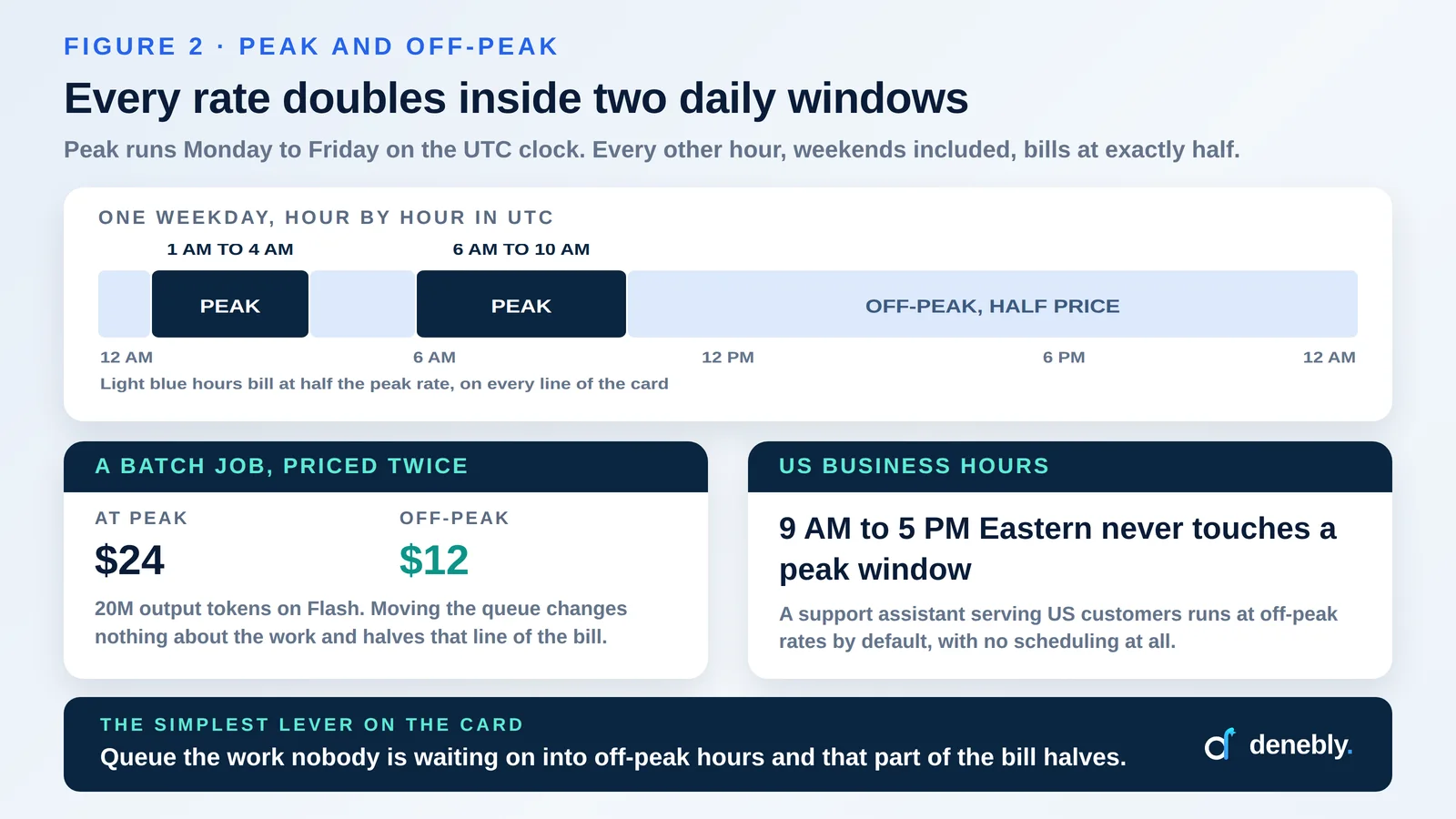
The second half of deepseek api pricing is timing. The same tokens cost exactly double inside the peak windows, on every line of the card, for both models.
The exact peak windows
Peak hours are 1 AM to 4 AM and 6 AM to 10 AM UTC, Monday to Friday, excluding Chinese public holidays. Every other hour is off-peak, and weekends are off-peak in full. Off-peak is not a small discount. It is exactly half the peak rate for cache hits, cache misses and output alike, so the clock is the simplest lever on this entire page.
What those windows mean in US hours
Read in Eastern time, the peak windows land at 8 PM to 11 PM and 1 AM to 5 AM. Read in Pacific time, they land at 5 PM to 8 PM and 10 PM to 2 AM. A normal US business day, 9 AM to 5 PM Eastern, never touches a peak window at all. A support assistant serving US customers therefore runs at off-peak rates by default, without anyone scheduling anything.
Scheduling work around the clock
The workloads that can move are the ones no customer is waiting on. Nightly summaries, catalog enrichment, document processing and report drafting can all be queued into off-peak hours. The arithmetic needs no model. A batch job that writes 20M output tokens on Flash costs $24 at peak rates and $12 off-peak. Moving the queue changes nothing about the work and halves that line of the bill.
The three billed parts of one request, at deepseek-flash rates. The repeated prefix is where the cheapest tokens in this article live.
Your Monthly DeepSeek Bill, Worked in Full
Rates only matter once they become a monthly number. Here is deepseek api pricing turned into one, for the workload most small teams asking about it actually have in mind.
The workload and its assumptions
The example is a support assistant on a company website, busy enough to matter and small enough to check by hand. It uses 120M input tokens a month. Of those, 75 percent are cache hits, because the system prompt, the policies and the product facts repeat on every conversation, and 25 percent are new customer text. It writes 40M output tokens a month. Swap in your own three numbers and the same table gives your bill.
The arithmetic, line by line
| Cost line | deepseek-flash, peak | deepseek-v4-pro, peak |
|---|---|---|
| Cache hit input, 90M tokens | $0.54 | $3.96 |
| Cache miss input, 30M tokens | $9.00 | $39.60 |
| Output, 40M tokens | $48.00 | $158.40 |
| Monthly total at peak rates | $57.54 | $201.96 |
| Monthly total at off-peak rates | $28.77 | $100.98 |
Two things stand out from the table. Output is the biggest line on both models, bigger than all input combined, so answer length matters more than prompt length. And the off-peak row is exactly half the peak row, because every rate halves. A US-facing assistant that mostly works business hours lives close to the off-peak row without trying.
The same month with no cache hits
Now remove the cache. All 120M input tokens bill as cache misses. The Flash month at peak rises from $57.54 to $84.00, and the Pro month rises from $201.96 to $316.80. The cache is worth $26.46 a month on Flash, a saving of 31.5 percent, and $114.84 on Pro, a saving of 36.25 percent. Expect your first month to sit between the two versions, because the cache builds as your repeated text settles.
If your own estimate lands higher than the work is worth, the fix is usually routing and caching rather than a cheaper headline rate. Our LLM integration team tunes exactly that, cost and latency together. Let’s discuss your project, and bring your token counts with you.
Flash or Pro, Choosing on Numbers
Choosing between the two models is where deepseek api pricing is won or lost, because Pro costs about three and a half times Flash on the same workload. The choice should be made per task, not per company.
What the Pro premium actually buys
Pro buys reasoning depth on hard, multi-step problems, the kind where a wrong intermediate step ruins the answer. It does not buy capacity. Both models hold the same 1M token context and the same 384K output ceiling, and Flash is the one that accepts image input. If a job involves screenshots, scanned documents or product photos, Flash is the only route on this card, whatever the budget.
The routed split most teams land on
The pattern that works is Flash by default, with Pro reserved for the tasks that fail on Flash. Run the worked month that way, 90 percent of it on Flash and 10 percent on Pro, all at peak rates, and the bill is $71.98. That is $14.44 more than the all Flash month and $129.98 less than the all Pro month, for a setup where the hardest tenth of the work gets the strongest model.
When the cheap model is the expensive one
Token price is not the whole cost of an answer. A wrong answer in a customer-facing flow creates refunds, escalations and human rework, and those are billed in salaries, not tokens. This is why our integration work measures cost per correct answer rather than cost per token, a distinction the natural language processing side of a build makes impossible to ignore. If Pro gets a hard task right the first time, it is the cheaper model for that task.
Five Moves That Cut a DeepSeek Bill
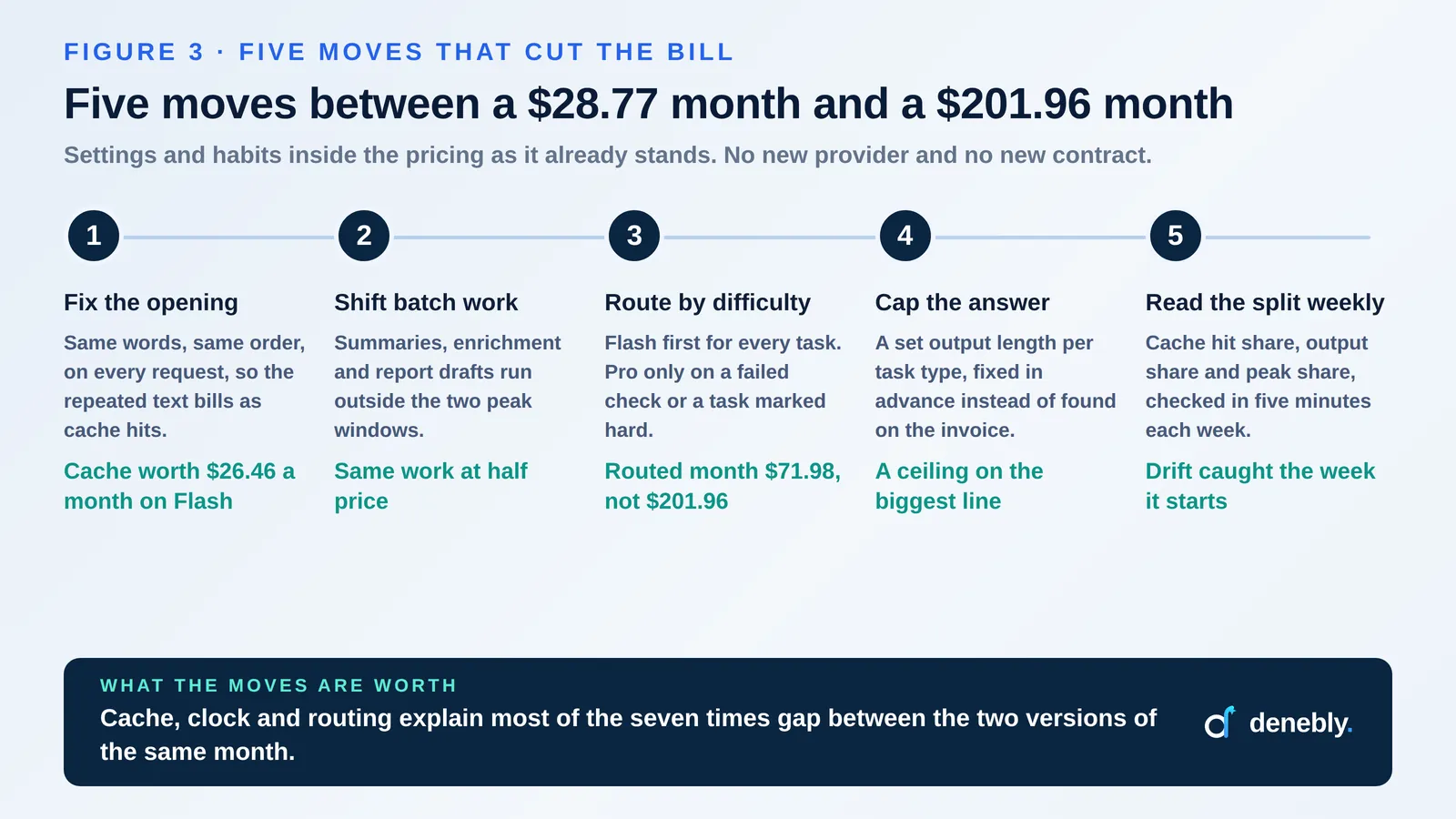
None of these moves needs a different provider or a renegotiated contract. They are settings and habits inside deepseek api pricing as it already stands, and together they explain most of the gap between the $28.77 version of a month and the $201.96 version.
Step 1. Keep the repeated opening identical
Put the system prompt, the policies and the reference material first, in the same words and the same order on every request, and let the variable customer text come last. A changed date line or a reordered paragraph at the top breaks the match and turns cheap cached tokens into full price ones.
Output. A cache hit share you can watch in the usage figures, holding steady instead of drifting down week by week.
Step 2. Move batch work into off-peak hours
List every job nobody waits for, summaries, enrichment, tagging, report drafts, and queue it outside the two peak windows. Most AI automation pipelines can shift their heavy runs by a few hours without any customer noticing the difference.
Output. The same work at half price, with the saving visible on the first bill after the schedule changes.
Step 3. Route by difficulty, not by habit
Send every task to Flash first. Escalate to Pro only on defined signals, a failed check, a low confidence score, or a task type you have marked as hard in advance. Routing by user, by department or by whoever set the system up first is how teams end up paying Pro rates for password reset questions.
Output. A routed bill close to the $71.98 version of the worked month, instead of the $201.96 all Pro version.
Step 4. Cap output length per task
Output is the most expensive token type on the card, so set a maximum answer length for each job type. A support answer rarely needs 2,000 tokens, and a classification needs a handful. Uncapped output is also where a looping or rambling response quietly turns into real money.
Output. A predictable ceiling on the biggest line of the bill, set per task instead of discovered per invoice.
Step 5. Read the usage split every week
Once a week, read three numbers, the cache hit share, the output share of total tokens, and the share of traffic landing in peak windows. Each one maps to a move above. A falling hit share means a prompt changed. A rising output share means answers are getting longer than the job needs.
Output. A five minute check that catches a cost problem in the week it starts, not at the end of the quarter.
The worked month, drawn four ways. Same tokens, same assistant, and the highest bar stands seven times above the lowest.
Costs the Rate Card Does Not Show
The rate card is honest, but it is not the whole bill. Three costs sit outside deepseek api pricing as published, and each one surprises teams in a different month.
Thinking tokens bill at the output rate
Both models run in thinking mode by default, which means the model writes out its reasoning before it writes the answer. Those reasoning tokens are generated tokens, billed at the output rate, the highest rate on the card. On a hard problem that is money well spent. On a long reasoning chain produced for a trivial request, it is pure waste, and non-thinking mode exists on both models for exactly those tasks.
Retries, tests and evaluation runs
Traffic that never reaches a customer still generates tokens. A test suite that runs 40 times a day, an evaluation harness comparing prompts, and a retry loop hammering a failing endpoint all spend balance. Put a number on it before it puts a number on you. Five million output tokens of testing on Flash at peak rates cost $6, which is trivial once, and a real line item when it runs every day for a quarter.
Gateway and reseller markups
Many teams reach DeepSeek through a gateway or reseller rather than the official API. Those sellers publish their own per token prices, and their prices do not always match the official card. Neither route is automatically wrong. The point is simpler. If you buy through a gateway, the gateway’s card is your price, and the official card in this article is the benchmark you compare it against before you commit volume.
Paying, Balances and Price Changes
The payment side of deepseek api pricing is short, and it works in the buyer’s favour, with two habits worth forming early.
How the balance is charged
DeepSeek works on a prepaid balance. The charge for usage is your token count multiplied by the product price, deducted from your balance, and any granted balance is spent before topped up balance. There is no end of month invoice to dread. The flip side is that a drained balance stops the product, not the billing cycle, so the balance level deserves the same weekly glance as the usage split.
Prices move, so check before you budget
The pricing page itself states that prices may vary and that DeepSeek reserves the right to adjust them. The model lineup behind this card has already changed names within the past year. So treat every figure in this article the way we treat our own estimates. It is the official card as read on November 11, 2026, and it should be rechecked at the start of any budgeting round, not quoted from memory in the next one.
Mistakes That Inflate DeepSeek Bills
Three mistakes account for most of the overspend we see discussed around deepseek api pricing, and all three are reading mistakes rather than engineering failures.
Mistake 1. Budgeting from an old blog post
The mistake. Older posts quote the prices of deepseek-chat and deepseek-reasoner, names that no longer appear on the current rate card. DeepSeek’s own pricing page notes that the legacy names deepseek-v4-flash and deepseek-v4-flash-vision-exp are still accepted, are served by the current Flash model, and bill at Flash prices. A budget built on a retired name and a retired price is wrong in both directions at once.
Mistake 2. Assuming every token is a cache miss, or none is
The mistake.Budgeting the worked month as if every input token were a cache miss gives $84 on Flash at peak, about 46 percent above the real $57.54. Budgeting as if everything were cached is worse, because it promises a number no real prompt mix can reach. Your usage report already contains your true split. Budget from that, and let the estimate improve as the cache warms up.
Mistake 3. Leaving thinking mode on for trivial work
The mistake. Thinking mode is the default, so a classification job, an extraction job or a yes or no routing decision can quietly pay output rates for a reasoning chain it never needed. The fix is one setting per task type. Keep thinking for the work that reasons, and turn it off for the work that sorts.
How Denebly Builds on Rates Like These
Reading a rate card is the easy part. The savings live or die in how the product around the model is built, which is where our own work on deepseek api pricing turns into engineering decisions.
Measured per correct answer, not per token
When we scope generative AI development for a client, the model layer is budgeted per correct answer on the client’s own test set, not per token on a vendor’s card. A cheaper model that fails a fifth of real questions costs more than its rate suggests, once the human cleanup is counted. That single measure settles most Flash versus Pro arguments before they start.
Routing and caching set up at build time
Our LLM integration and fine-tuning work sets the routing rules, the prompt structure and the output caps before launch, then tunes them against real usage in the first weeks. The five moves in the checklist above are not aftercare. They are line items in the build, tested like any other feature, because a pricing decision made late is usually made at peak rates.
Tell us the workload and we will price the model layer with you, before anything is built. Let’s discuss your project.
Conclusion
DeepSeek API pricing rewards the teams that read the whole card. Flash input can cost $0.003 or $0.30 per 1M tokens depending on the cache, every rate doubles or halves with the clock, and output is where the money goes. Get those three levers right and the worked month in this article costs $28.77. Get them wrong and the identical workload costs $201.96.
If you want those levers set up properly inside a working product, Denebly builds AI tools for small businesses across the United States from Dallas, Texas. Start on the contact page, write to sales@denebly.com, or call +1 (214) 896-2906, and bring your token counts with you.
Frequently Asked Questions
How much does the DeepSeek API cost per 1M tokens?
It depends on the model, the token type and the hour. On deepseek-flash, input runs from $0.003 per 1M tokens for a cached prefix off-peak to $0.30 for fresh input at peak, and output runs from $0.60 to $1.20. On deepseek-v4-pro, input runs from $0.022 to $1.32 and output from $1.98 to $3.96. The full card sits in the table at the top of this page, read from the official pricing documentation on November 11, 2026.
What is the difference between a cache hit and a cache miss?
A cache hit means the opening part of your prompt matched text DeepSeek had already processed and stored, so it bills at the lowest input rate on the card. A cache miss means the input is new and is processed in full, at up to 50 times the cache hit rate on Flash. Keeping your system prompt and reference material identical across requests is what produces cache hits.
When are DeepSeek peak hours?
Peak hours are 1 AM to 4 AM and 6 AM to 10 AM UTC, Monday to Friday, excluding Chinese public holidays. Every other hour is off-peak, weekends included, and off-peak rates are exactly half the peak rates on both models. In US time zones the peak windows fall in the evening and overnight, so ordinary US business hours run off-peak.
Is the DeepSeek API free?
No. The API is a paid product charged against a prepaid balance, at the rates on the official card. The free DeepSeek chat app is a separate consumer product and does not come with API credits. Your balance is spent only on the tokens and requests you actually use, and any granted balance is spent before topped up balance.
Which is cheaper, deepseek-flash or deepseek-v4-pro?
Flash, on every line of the card. At peak rates, Pro output costs $3.96 per 1M tokens against $1.20 on Flash, and Pro fresh input costs $1.32 against $0.30. Even the cache hit rates differ by more than seven times at peak, $0.044 on Pro against $0.006 on Flash. Pro earns its price on harder reasoning work. Most teams run Flash by default and route only the difficult share of tasks to Pro.
Does DeepSeek charge for thinking or reasoning tokens?
Yes. Both models run in thinking mode by default, and the tokens the model generates while reasoning bill at the output rate, like the rest of its answer. Output is the most expensive rate on the card, so reasoning length is worth watching. For mechanical tasks such as classification and extraction, switching to non-thinking mode removes that cost.
What happened to deepseek-chat and deepseek-reasoner?
Those names no longer appear on the current rate card, which lists deepseek-flash and deepseek-v4-pro. The official pricing page notes that the legacy names deepseek-v4-flash and deepseek-v4-flash-vision-exp are still accepted, are served by the current Flash model, and bill at Flash prices. Any budget or tutorial quoting the old names should be rechecked against the current card.
How can I lower my DeepSeek API bill?
Four moves do most of the work. Keep the repeated opening of your prompts identical, so it bills as cache hits instead of fresh input. Move batch jobs into off-peak hours and halve their cost. Run Flash by default and route only hard tasks to Pro. Cap output length per task, because output is the most expensive token type on the card.
Sources
DeepSeek API documentation, Models and Pricing page, read in full on November 11, 2026, at api-docs.deepseek.com. Every rate, model version, context limit, concurrency limit and balance rule in this article comes from this page. Its limit is printed on the page itself. Prices may change, so the figures here are the card as published on the check date.
DeepSeek API documentation and the independent V4 reference guide at deepseekai.guide, read November 2026, for how each response reports its cache hit and cache miss token counts. Its limit is that it is a third party guide, so where it and the official pricing page could differ, this article follows the official page.
Independent pricing guides from Puter, Lindy and Flatkey, read November 2026, used to check which questions buyers actually ask and how the peak windows read in US time zones. Their limit is that they summarise the same official card, so no price in this article rests on them.
Denebly’s own LLM integration services page, for the cost per correct answer measure and the routing practice described in the build sections. Its limit is that it describes our own process, not an independent benchmark.

WRITTEN BY
Arslan Mushtaq
Founder, Denebly
Arslan founded Denebly in 2018 and leads its AI development work for startups and mid-size businesses, across AI chatbots, agentic workflows, RAG systems, machine learning and automation. Denebly has delivered 100+ projects from Dallas, Texas.
Ready to Solve Your Business Problems With AI?
Tell us what you are trying to build, automate or fix. You will get an honest assessment within one business day, not a sales pitch.