Insights
What Are AI Virtual Receptionist Services? A Complete Guide for Small Businesses
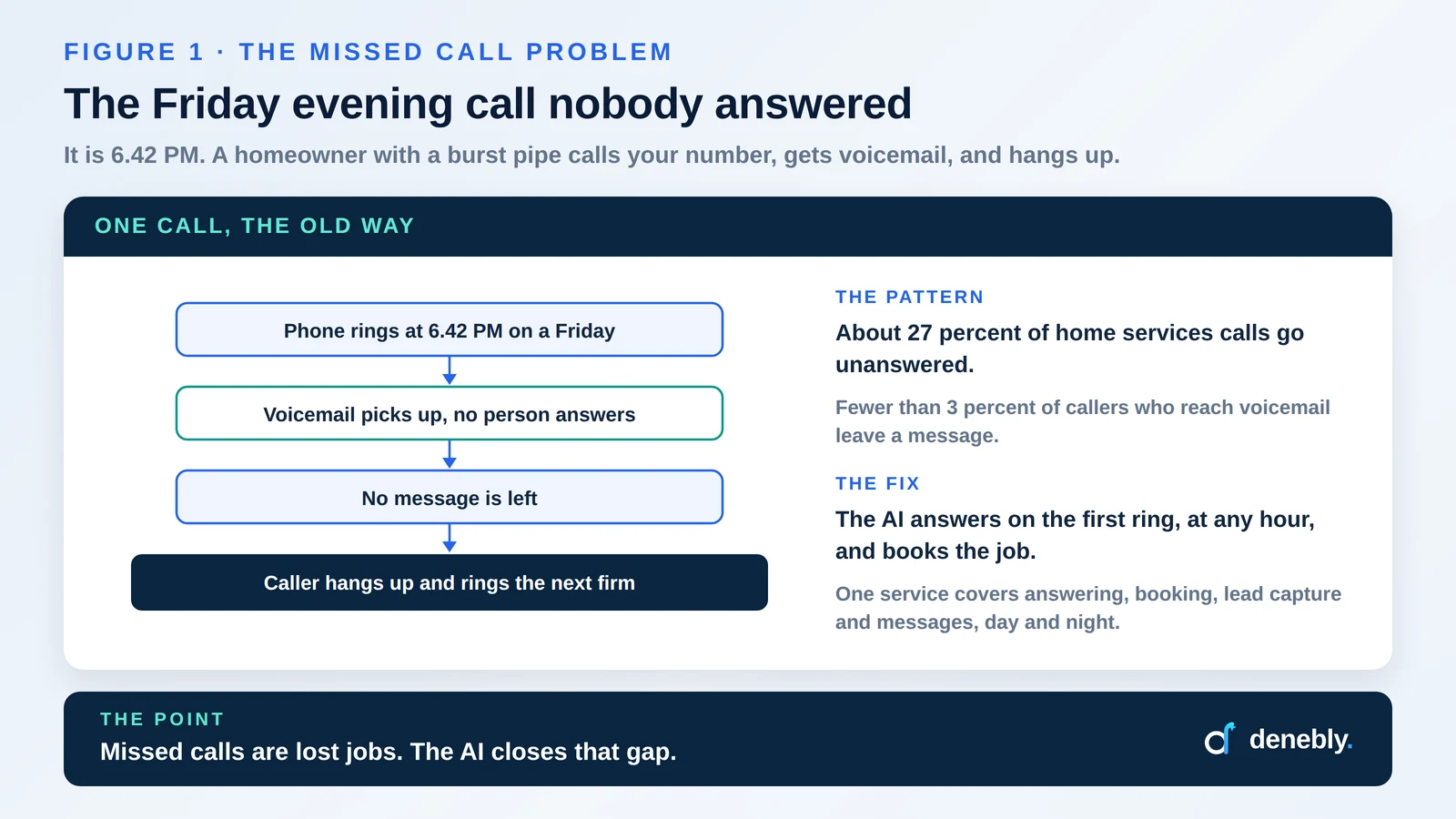
It is 6:42 p.m. on a Friday. A homeowner with a burst pipe calls your number, gets voicemail, and hangs up. The pattern is plain: about 27 percent of home services calls go unanswered, and fewer than 3 percent of callers who reach voicemail leave a message. AI virtual receptionist services close that gap: the AI answers and books the job.
AI virtual receptionist services use voice AI to answer your business calls 24 hours a day. The AI greets callers in your business name, answers questions from your own information, books appointments, captures lead details, takes messages, and transfers urgent calls to your team, for far less than one hire.
Key takeaways:
- One service covers answering, booking, lead capture and messages, day and night.
- Plans run about $30 to $300 a month, against about $3,800 for a full time receptionist.
- Best fit: clinics, law firms, home services, real estate.
- Rent a tool, build on a platform, or get a custom agent built.
If missed calls are already costing you work, start with our AI readiness audit, or let’s discuss your project.
What Are AI Virtual Receptionist Services?
AI virtual receptionist services are software services that put a voice AI agent on your business phone line. A traditional virtual receptionist is a person in a call center. The AI version does the same core job with software: it picks up on the first ring, at any hour, and handles many calls at once.
Every setup has 4 parts. The voice agent is what callers hear. The knowledge base holds your services, prices, hours and policies. The integrations connect the agent to your calendar and CRM, so bookings and call records land where your team works. The transfer rules decide which calls go to a person. Denebly builds this kind of agent as part of its conversational AI assistants service.
AI Receptionist vs IVR vs Virtual Receptionist vs Answering Service
These four get mixed up. The difference decides what you should buy.
| Option | Who or what answers | What it can do | Main limit |
|---|---|---|---|
| IVR phone menu | A recorded menu | Routes callers by keypad press | No conversation, no booking |
| Answering service | People in a call center | Takes messages, follows a script | Per minute cost adds up |
| Human virtual receptionist | A remote person | Conversation, basic booking, judgment | Set hours, one call at a time |
| AI virtual receptionist | Voice AI software | Conversation, booking, lead capture, 24/7 | Follows the rules you give it |
How AI Virtual Receptionist Services Work
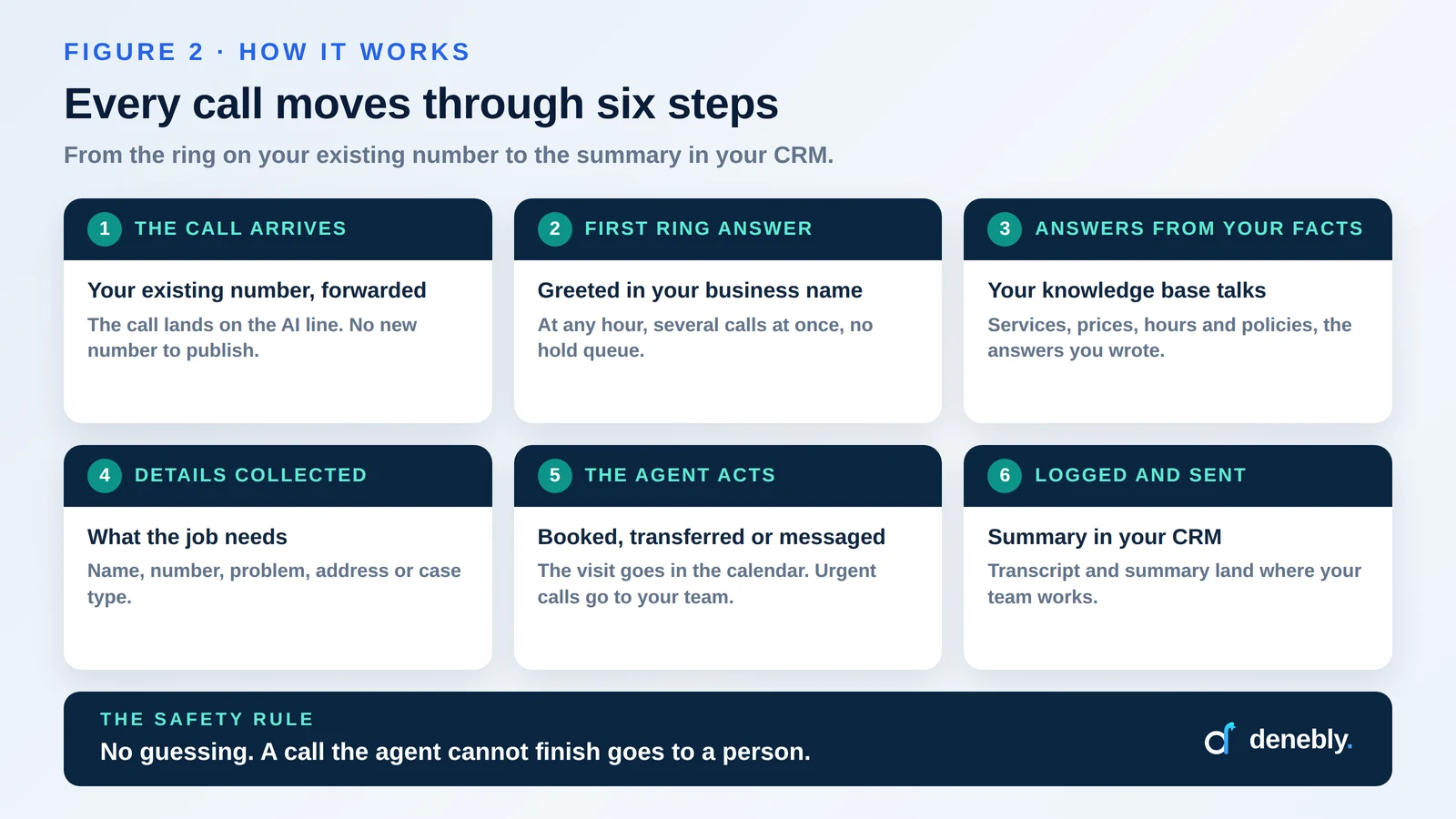
A call moves through 6 steps:
- The call arrives on your existing number, forwarded to the AI line.
- The agent answers on the first ring, greeting the caller in your business name.
- It listens and answers from your knowledge base.
- It collects what matters: name, number, problem, address or case type.
- It acts: books the appointment, transfers the call, or takes a structured message.
- It logs the call and sends the transcript and summary to your CRM.
The Knowledge Base: Where the Answers Come From
The agent only knows what you put in its knowledge base: services, price ranges, hours, service area, policies. A strong one answers the 30 or so questions callers actually ask. A thin one gives vague answers. In the builds I scope at Denebly, the first document we write is that list.
Transfer Rules: What Happens When the AI Cannot Finish the Call
No agent should guess. Good transfer rules name the moments a person takes over: an emergency, an angry caller, a question outside the knowledge base, or a caller who asks for a human. The transfer can be warm, the agent briefing your team member first, or a priority callback.
Getting Set Up: Your Number, Your Knowledge Base, Go Live
You keep your existing number and forward it, or port it. Then: load the knowledge base, connect calendar and CRM, pick the voice, set greeting and transfer rules, and run test calls. A self serve tool can be live the same day; a custom build takes longer.
What an AI Receptionist Handles on Every Call
The daily job list is the same across providers: greeting callers, answering routine questions, booking, moving and cancelling appointments, capturing lead details, routing urgent calls, and taking messages with a transcript and summary. After hours and overflow coverage come built in, and the agent takes several calls at once, no hold queue. Booked callers also get confirmations and reminders automatically, which is where AI virtual receptionist services overlap with wider AI automation services.
Who Uses AI Virtual Receptionist Services?
Any business that books work by phone is a candidate. These four show the pattern:
Dental and Medical Clinics
The agent books and moves appointments, answers hours and insurance basics, and sends intake details to the front desk. One point is not optional: if the agent touches patient information, the vendor must sign a Business Associate Agreement (BAA) and respect HIPAA rules. The US Department of Health and Human Services sets those HIPAA requirements for clinic tools too. Our dental clinics page goes deeper.
Law Firms
Intake is the job. The agent asks the screening questions your firm sets, books the consultation, and flags urgent matters for a same day callback. Nothing the caller hears is legal advice. See our page for law firms.
Home Services
Plumbers, HVAC teams and electricians lose the most calls while on jobs. The agent sorts emergency from routine, books the visit window, captures the address and problem, and sends details to dispatch. The burst pipe call becomes a booked job.
Real Estate and Other Appointment Based Businesses
Agents book viewings, answer listing questions, and route hot buyers fast. Salons and repair shops use the same shape.
How Much Do AI Virtual Receptionist Services Cost?
The 4 Billing Models
Almost every plan bills in one of 4 ways:
- Per minute: pay for talk time, about $0.07 to $0.31 a minute on build platforms, $1.50 to $5.00 for live answering.
- Per call: a set price per call. Overage calls usually cost $1.67 to $3.00 each.
- Per unique caller: pay per person who calls, minutes unlimited. Fair for short, frequent calls.
- Flat rate: one monthly price, commonly $29.99 to $199, to a fair use limit.
Popular Tools, Compared
Prices come from published plans checked in October 2026. Treat them as the shape of the market, not a quote.
| Tool | Type | Billing model | Starting price |
|---|---|---|---|
| Smith.ai | AI with human backup | Per call | Free 25 calls, then from $150 a month |
| Rosie | AI first | Per minute | From $49 a month, 250 minutes |
| Goodcall | AI first | Per unique caller | From $79 a month, 100 callers |
| Ruby | Human receptionists | Per minute | From $250 a month, 50 minutes |
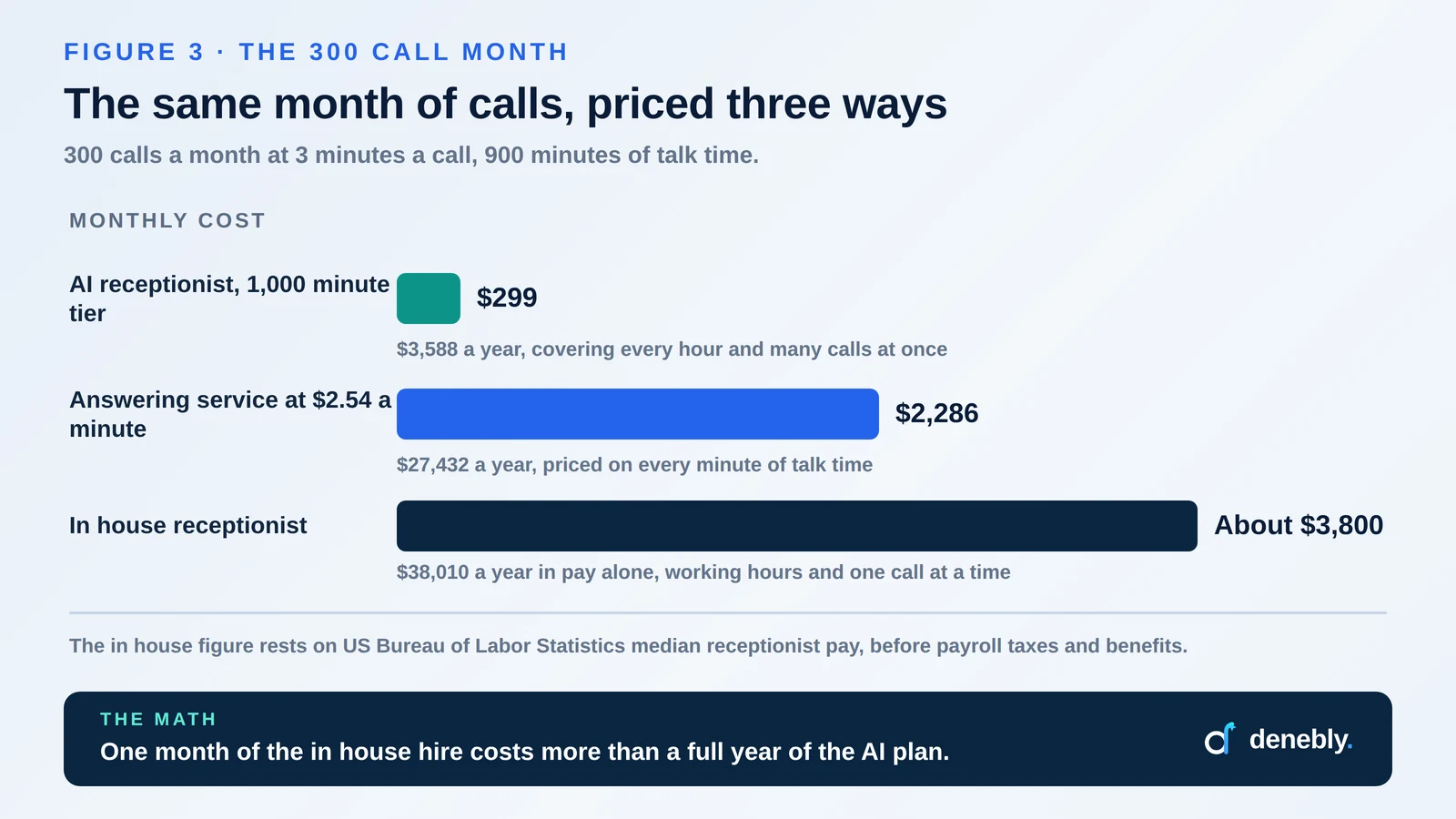
The 300 Call Month, Priced 3 Ways
Take a business with 300 calls a month, at 3 minutes a call: 900 minutes of talk time.
| Route | Monthly cost | Yearly cost |
|---|---|---|
| AI receptionist, 1,000 minute tier | $299 | $3,588 |
| Answering service at $2.54 a minute | $2,286 | $27,432 |
| In house receptionist | About $3,800 with payroll costs | $38,010 in pay alone |
The in house figure rests on the US Bureau of Labor Statistics: median receptionist pay of $38,010 a year, before payroll taxes and benefits. The answering service figure uses the $2.54 a minute benchmark.
Hidden Costs and Billing Traps
The plan price is not the bill. Check for: minutes rounded up; spam and hang up calls billed; hold and transfer time billed as talk time; off call work billed as minutes; 28 day billing cycles; credits converting below the headline rate; booking and CRM features locked behind higher tiers; HIPAA support as a paid add on; and overage that auto upgrades your plan.
Costs clear now? The honest next step is a scoped quote. Let’s discuss your project: tell us your call volume, and Denebly will price the build in writing first.
AI Receptionist vs Human Receptionist vs Answering Service
| Factor | AI receptionist | Human receptionist | Answering service |
|---|---|---|---|
| Monthly cost | About $30 to $300 | About $3,800 loaded | About $1.50 to $5.00 a minute |
| Hours covered | 24/7, holidays included | Working hours | 24/7 on most plans |
| Calls at once | Many at once | One | Several, shared |
| Consistency | Same answers every call | Varies by person and day | Varies by operator |
| Setup time | Same day for tools, 2 to 4 weeks custom | Weeks of hiring | A few days |
| What it cannot do | Judgment calls outside its rules | Be awake at 2 a.m. | Know your business well |
Off the Shelf Tool, Platform Build, or Managed Build?
There are 3 routes to the same result. Rent a tool when your calls are simple: hours, prices, bookings. You go live fast and cheap, inside the tool’s limits. Build on a platform like Retell AI or Vapi when your team has technical skill and your flows are unusual; you pay per minute and own the setup work. Choose a managed build when the agent must match your exact intake questions, and nobody on your team has time to maintain it.
This decision is where Denebly works. A managed build means your agent is trained on your knowledge base, connected to your calendar and CRM, and tested on real call scenarios before launch. The same discipline applies if customers reach you by chat: our AI chatbot development work follows the same process. Focused builds go live in 2 to 4 weeks, price agreed in writing, and you own the setup. More on our conversational AI assistants.
If that route fits your situation, let’s discuss your project. Bring your busiest month’s call pattern, and we will tell you honestly if a rented tool would do.
The Five Test Calls: Run Them Before You Pay
Do not judge an AI receptionist by its demo. Judge it by these 5 calls, run on a trial line:
- The 9 p.m. emergency call. Call after hours with an urgent problem. Pass: it sorts the emergency and routes it fast. Fail: voicemail or a slow script.
- The unlisted price question. Ask what your price list does not cover. Pass: it arranges a callback to confirm. Fail: it invents a number.
- The booking change. Book, then move the appointment. Pass: the calendar updates once, cleanly. Fail: two bookings or a lost change.
- The angry caller. Complain, firmly. Pass: it stays calm and transfers you to a person. Fail: it argues or keeps selling.
- The message accuracy check. Leave a message with a name, number and two facts. Pass: the summary has all three right. Fail: a wrong digit or missing fact.
When I test an agent before launch, the 9 p.m. call is the one I make first.
3 Mistakes That Make AI Receptionists Fail
Most failures are setup problems, not voice problems.
- A thin knowledge base with no owner. The agent launches with 10 answers, callers ask 30 questions, and trust dies in week one.
- Missing transfer rules. The agent tries to finish calls it should hand over, so emergencies get a script, not a person.
- No AI disclosure and no upkeep. Callers should know they are speaking with an AI assistant; hiding it backfires. And a knowledge base nobody updates slowly turns wrong.
Who Owns the Knowledge Base After Launch?
Name one person. Their rhythm: read the call transcripts weekly, note every question the agent could not answer, fix those answers, and check summary quality monthly. In the builds I scope, ownership is agreed before launch.
How to Choose: 7 Checks Before You Sign
- Size the plan from one real month of call logs, not a guess.
- Confirm it books into your calendar and logs into your CRM.
- Read the overage terms: rate, rounding, and what happens when the allowance runs out.
- Test the transfer rules with the Five Test Calls above.
- Check transcript and summary quality on your own test calls.
- Ask what happens to your number and data if you cancel.
- For clinics and firms, complete the compliance checklist below first.
The Compliance Checklist
- BAA: if patient or client data is involved, get the Business Associate Agreement signed before launch.
- AI disclosure: the greeting tells callers they are speaking with an AI assistant.
- Recording consent: AI voice calls sit under TCPA rules. The FCC counts AI generated voices as artificial voices under the TCPA; read its guidance on AI voice calls first.
- Data retention: know how long transcripts and recordings are kept.
- Access controls: only named team members can open call records.
Frequently Asked Questions
How much do AI virtual receptionist services cost?
Most small businesses pay about $30 to $300 a month. Flat plans run $29.99 to $199.
Is an AI receptionist worth it for a small business?
Usually yes, if unanswered calls cost you one job a month. One booked job often covers a year of the plan.
Can an AI receptionist book appointments?
Yes. The agent checks your calendar, books, moves or cancels visits, and sends confirmations.
Will callers know they are talking to an AI?
They should. Good setups disclose it in the greeting, and callers accept it when answers are right.
What happens when the AI cannot answer a question?
It follows your transfer rules: it passes the call to a named person, or takes a structured message for callback.
Can I keep my existing business number?
Yes. Most setups forward your current number to the AI line. Porting is also possible.
Is an AI receptionist HIPAA compliant?
It can be, if the vendor signs a BAA and the setup follows HIPAA safeguards. Confirm it in writing first.
How long does it take to set up an AI receptionist?
A self serve tool can go live the same day. A custom build takes 2 to 4 weeks.
Can an AI receptionist replace my human receptionist?
For routine phone work, largely yes. People still win on visitors and callers who need judgment.
Can it handle several calls at the same time?
Yes. The agent answers every call on the first ring, even five at once.
Conclusion
AI virtual receptionist services turn the calls you already get into booked work, day and night, at a cost far below a hire or a per minute answering service. The technology is the easy part. The result depends on the knowledge base, the transfer rules and the testing.
Let’s discuss your project. Denebly builds custom AI receptionists for small businesses from Dallas, Texas, price agreed in writing, focused projects live in 2 to 4 weeks. Write to sales@denebly.com or call +1 (214) 896-2906.

WRITTEN BY
Arslan Mushtaq
Founder, Denebly
Arslan founded Denebly in 2018 and leads its AI development work for startups and mid-size businesses, across AI chatbots, agentic workflows, RAG systems, machine learning and automation. Denebly has delivered 100+ projects from Dallas, Texas.
Ready to Solve Your Business Problems With AI?
Tell us what you are trying to build, automate or fix. You will get an honest assessment within one business day, not a sales pitch.