Appointment Automation for Small Business, Bookings, Reminders and No-Shows Fixed in the Right Order
A customer finds your number at 8.15 p.m., after your last appointment has ended. She calls, hears four rings, then voicemail. Within a minute she has booked online with the shop that answered in twenty seconds.
Appointment automation is the setup that books, confirms and reminds without your staff touching the phone. A booking page tied to your live calendar takes the booking, messages confirm it and chase no-shows, and a reschedule link fills gaps before they cost you money.
If most of your bookings still arrive by phone and chat, our AI chatbot development team can put the same booking flow on those channels, so the calendar fills itself there too.
What appointment automation is, and what it is not
It is a set of connected steps around one calendar. A customer picks an open slot, the system writes it to the calendar, sends a confirmation, sends reminders before the visit, and offers a one-tap way to move or cancel. Each step runs on rules you set once.
It is not a prettier calendar, and it is not a robot that replaces your front desk. Staff still handle the odd case, the regular who needs a longer slot, the booking that needs a judgment call. The system takes the repeat work, which is most of the work.
The split matters when you buy. A tool that only sells a booking page leaves the reminders and the gap filling to you, and those steps are where the money is saved.
The five layers, and the order to build them
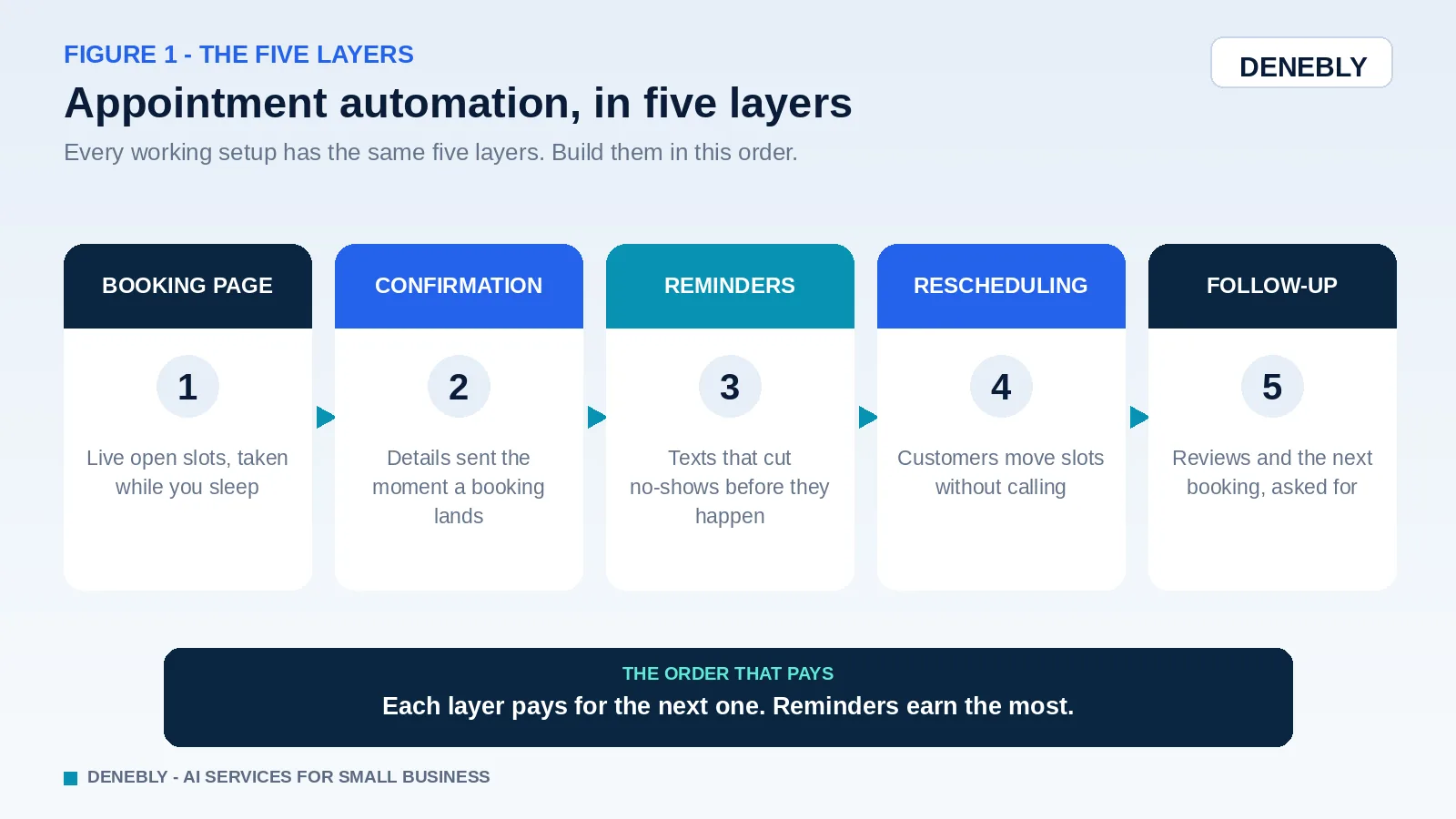
Every working setup has five layers. Build them in this order, because each layer pays for the next one.
| Layer | What it does | Why it earns | Typical first cost |
|---|---|---|---|
| 1. Booking page | Shows live open slots and takes the booking | Books while you work and while you sleep | Free to 10 dollars a month |
| 2. Instant confirmation | Sends the details the moment a booking lands | Stops the did-you-book-me calls | Included in most plans |
| 3. Reminder sequence | Texts and emails before the visit | Cuts no-shows, the biggest leak | Included from mid plans up |
| 4. Self-service rescheduling | Lets customers move or cancel from the message | Frees the slot early enough to refill it | Included in most plans |
| 5. Follow-up and recall | Asks for the review and the next booking | Turns one visit into repeat work | Included or a small add-on |
Most owners buy layer 1 and stop. The Epiphany Dynamics setup guide, read 24 November 2026, treats booking capture, confirmations, reminders and rescheduling as four separate workflows you can switch on one at a time.
What an empty slot actually costs you
A systematic review by Dantas and co-authors in Health Policy, 2018, pooled 105 studies and found an average no-show rate of about 23 percent. The studies lean toward healthcare, so treat that as a planning figure, not a promise for your trade.
Take a fictional three-chair salon that books 300 appointments a month at an average ticket of 85 dollars. At a 20 percent no-show rate, 60 slots a month stand empty, and 5,100 dollars of booked work never happens. That is the leak, before anyone talks about software.
Now the recovery. Hasvold and Wootton, in the Journal of Telemedicine and Telecare, 2011, pooled 29 studies and found automated reminders cut non-attendance by about 29 percent relative to the starting rate. Applied to the salon, 60 empty slots fall to about 43, so about 17 appointments a month come back, worth about 1,445 dollars.
The second saving is staff time. The US Bureau of Labor Statistics puts the median receptionist wage at 18.27 dollars an hour, May 2025. Six hours a week of booking calls, reminder calls and reschedule calls cost about 5,700 dollars a year at that rate. Getting even half of it back pays for the software many times over.
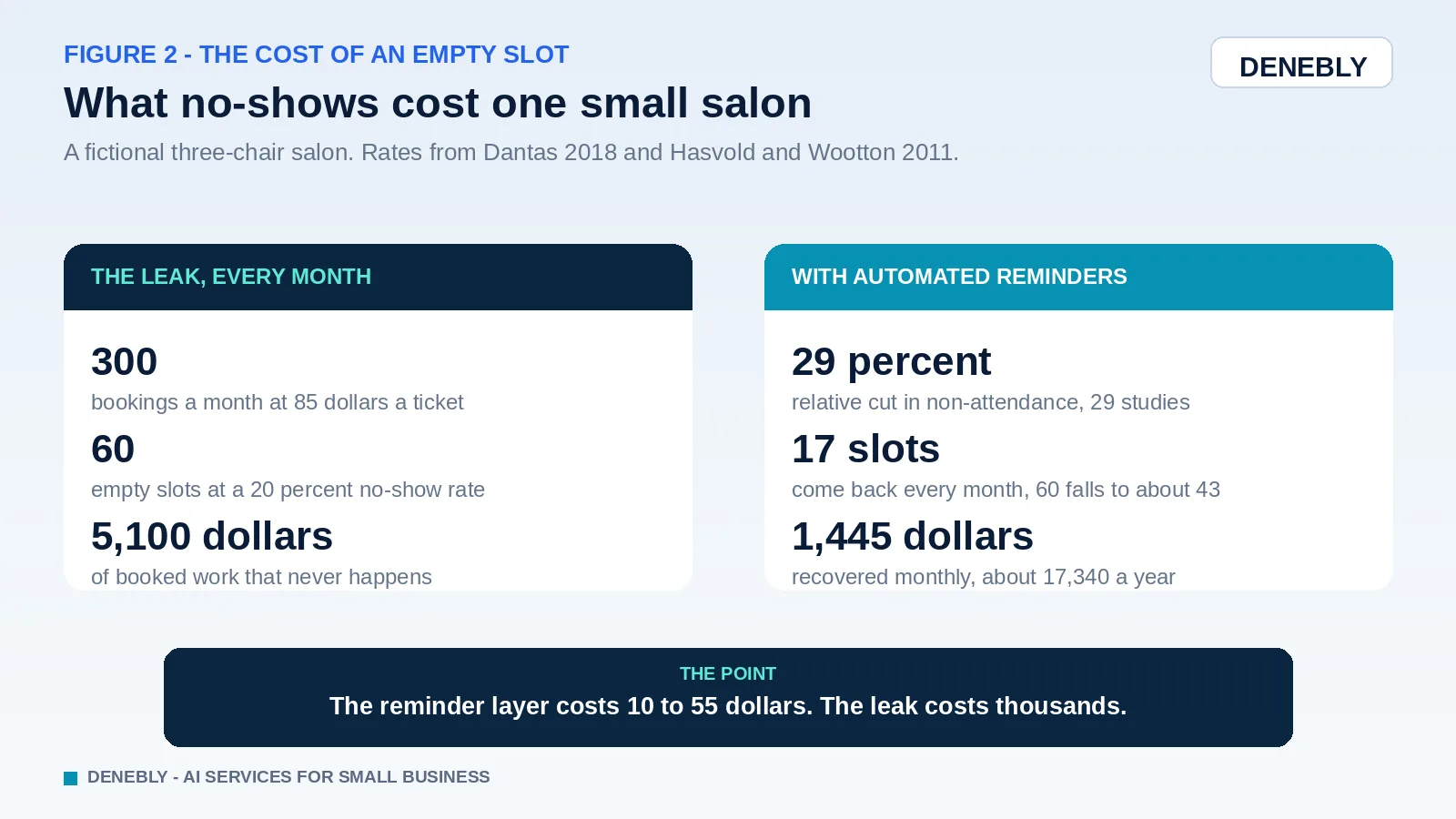
Figure, the salon math above, drawn out. The salon is fictional, and both reviews lean toward healthcare, so plan on your own rate.
The reminder sequence that cuts no-shows
The best test of reminders is a meta-analysis by Robotham and co-authors in BMJ Open, 2016. Across 21 randomized studies, patients who got text notifications were 25 percent less likely to no-show than patients who got none, 15 percent against 21 percent. More than one message beat a single message. The studies were clinics, so expect the same direction, not the same size.
| When | Channel | Job |
|---|---|---|
| At booking | Email and text | Confirm the slot and carry the reschedule link |
| 24 hours before | Text | Ask for a reply to confirm, surface problems early |
| 2 hours before | Text | Final nudge with the address or the meeting link |
Copy these three messages and change the names. Short beats clever, and every message carries the link.
- Confirmation. Booked. You are with [name] on [day] at [time] for [service]. Need to move it? Use this link, no need to call. [link]
- 24 hours before. Reminder, [service] tomorrow at [time]. Reply YES to confirm, or move it here. [link]
- 2 hours before. See you at [time] today. We are at [address]. Running late? Reply here and we will hold your slot for 10 minutes.
Sometimes the reminder needs a real reply, a customer saying the babysitter cancelled and asking for Thursday instead. Text alone runs out there. That is where conversational AI assistants earn their place. They hold the short exchange and move the booking, without a staff member picking up the phone.
Booking rules that stop double bookings and bad bookings
The system follows your rules exactly, so the rules are the product. Set them once, in writing, before the page goes live.
- Buffers. 10 to 15 minutes between appointments, for cleanup, notes and the late arrival.
- Minimum notice. Two hours for a standard booking, 24 hours for long or high-value slots.
- Daily limits. Cap new-customer bookings per day, so one channel cannot flood a single day.
- Intake questions. Name, mobile number, the service wanted, and one question that changes the work. Never a long form.
- One calendar. Every channel writes to the same calendar, or double bookings come back.
The common failure is two calendars, the paper diary at the desk and the online one. Pick one source of truth in week one, even if the paper book stays on the desk as a read-only backup.
The tools, priced and grouped by job
Appointment automation tools fall into three groups, by how your customers book. Prices were checked on vendor pages on 15 October 2026 by Commerce Pundit, read 24 November 2026. Vendors change prices, so confirm before you buy.
| Tool | Best for | Price a month | Reminder note |
|---|---|---|---|
| Calendly | Solo professionals and small teams | Free, then 10 dollars per seat Standard, 16 Teams | No automated reminders on the free plan |
| Acuity Scheduling | Multi-staff service businesses | 16 Starter, 27 Standard, 55 Premium, billed yearly | Text reminders from the Standard plan |
| Square Appointments | Shops already on Square payments | Free plan, paid tiers above it | Reminders on the free plan, no-show fees on Plus |
| Setmore | Salons and consultants on a budget | Free, Pro from 5 dollars per user | Text reminders listed in its guide entry |
| Google and Microsoft | Businesses already on Workspace or 365 | Included with those plans | Basic confirmations, fewer reminder options |
Pick by booking channel, not by feature list. If customers book from a link, Calendly or Acuity is enough. If they book at the till, Square keeps payments and bookings in one place. If they book by message and phone, you need the layer in the phone section below.
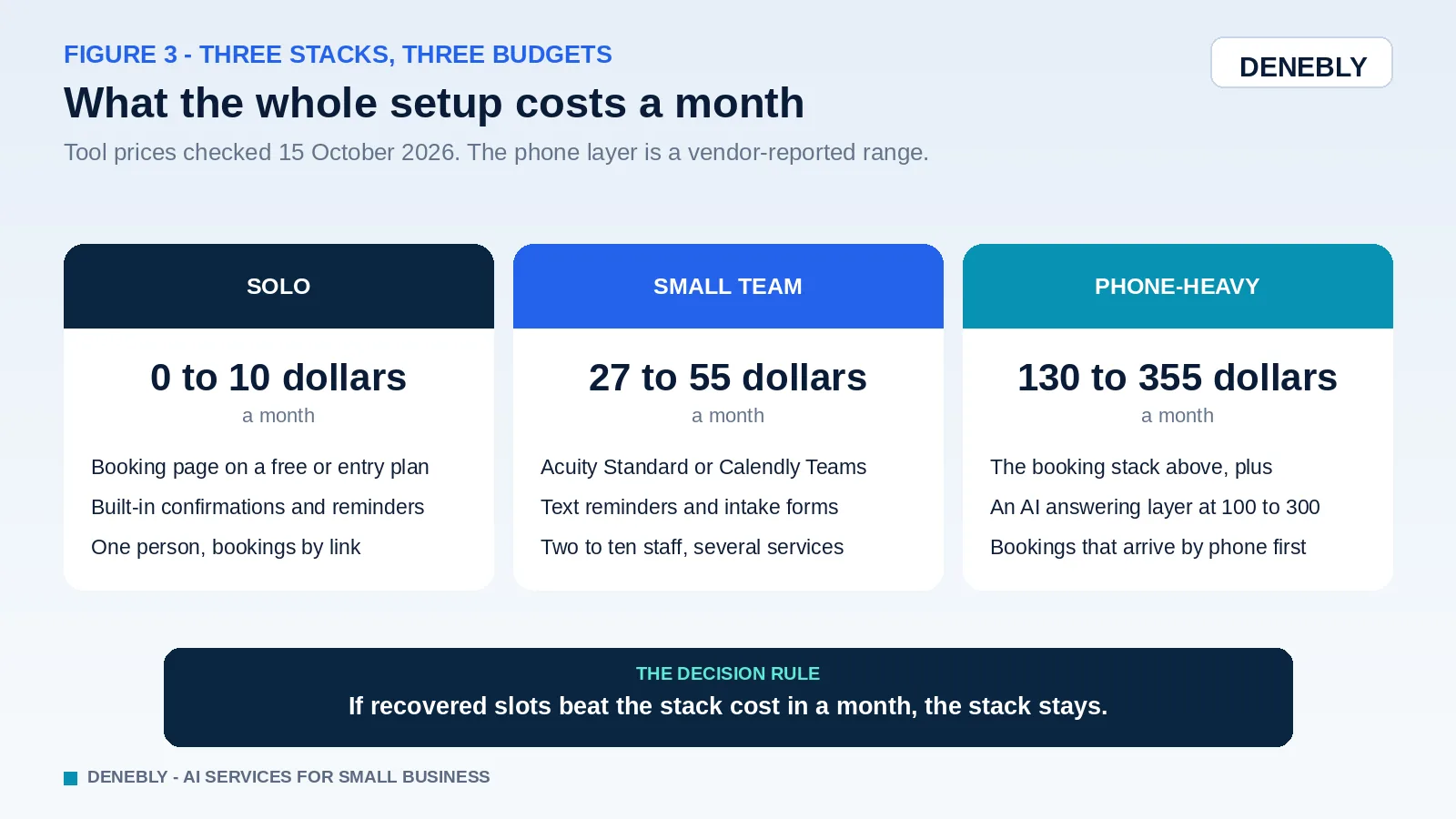
Figure, the three stacks from the cost section below, with the tool prices from the table above.
What it costs in total, three stacks
| Stack | What is in it | Monthly cost | Fits |
|---|---|---|---|
| Solo | Booking page plus built-in reminders | 0 to 10 dollars | One person, link bookings |
| Small team | Acuity Standard or Calendly Teams for a few seats | 27 to 55 dollars | Two to ten staff, several services |
| Phone-heavy | Booking stack plus an AI answering layer | About 130 to 355 dollars | Bookings that mostly arrive by phone |
The phone-heavy range adds the 100 to 300 dollars a month that the Brothers Automate setup guide, read 24 November 2026, reports for AI receptionist cover. That is a vendor-reported range, not a market survey, so get two quotes before you treat it as the going rate.
The decision rule is simple. If the slots you recover in one month are worth more than the stack costs, the stack stays. The salon in the cost section above recovers about 1,445 dollars a month, which clears even the phone-heavy stack.
The setup, step by step in one weekend
- Connect one booking tool to the calendar you already live in, and turn off every other booking route for a week. Output, one calendar that every booking lands on.
- Write your services with real durations, cleanup time included, and set the buffers and minimum notice from the rules section. Output, a service list the page can sell without you checking.
- Turn on the instant confirmation and the two reminders, with the reschedule link in every message. Output, the three messages live, tested on your own phone.
- Put the booking link where customers already look. Website contact page, Google Business Profile, email signature, and the shop door sign. Output, four live entry points.
- Book yourself in as a test customer, then reschedule and cancel from the messages. Fix anything that confused you before a real customer sees it. Output, one clean test booking, moved and cancelled without a call.
Most setups fail at step 4, not step 1. The tool works, but the link sits on a page nobody visits, so the phone keeps ringing and the owner decides the software does nothing.
Reschedules, cancellations and the waitlist
A cancellation is not a loss if it arrives early. The reschedule link turns a silent no-show into a slot you can offer again, which is why it belongs in every message the system sends.
Copy this policy onto your booking page and into the confirmation message.
Life happens. Move or cancel free of charge up to 4 hours before your appointment, using the link in your confirmation. Inside 4 hours, call us and we will do our best. A booking that does not show and does not call may need a deposit next time.
Keep a short waitlist for the best slots, Saturday mornings and late afternoons. When a cancellation lands, the system offers the slot to the waitlist in order. Even two or three filled gaps a month is work you had already sold once.
When the phone is the booking channel
Some trades book by phone first. A customer with water on the floor does not fill in a form, she calls. For those businesses the booking page is the backup, and the front line is an assistant that answers, checks the calendar and books the slot on the call.
This is also where a missed call stops being a lost job. Our guide to the best AI receptionist for small business walks through what those systems handle on a call, and where a human still has to take over.
Judge any phone layer on three tests. It books into the same calendar as the page. It hands over to a person when the caller asks twice. And it sends the same confirmation and reminders after the call. Fail one test and it is a message taker, not booking automation.
Mistakes that make owners rip the system out
- Two calendars. The paper diary and the online page drift apart within a month, and the first double booking ends trust in the system.
- A long intake form. Every extra question costs bookings. Four fields is a working ceiling for a first booking.
- One reminder only. The research above is clear that a sequence beats a single message, and the second reminder is the cheap one to add.
- No reschedule link. Without it, a customer who cannot come has two choices, call during your busiest hour, or simply not show.
- Turning it all on at once. Five layers in one weekend means five places to debug. One layer a week is slower, and it sticks.
None of these is a software fault. Each one is a setup choice, and each one can be fixed in the settings in under an hour.
A 30-day measurement plan
You cannot judge the system on feel. Track four numbers for the 30 days before you switch, and the 30 days after.
| Number | Where it comes from | What good looks like |
|---|---|---|
| No-show rate | Bookings set against attended visits | Down from your starting rate, any clear drop counts |
| After-hours bookings | The booking tool report | A real share of bookings landing outside open hours |
| Staff minutes on booking | A rough tally at the desk for one week | Down against the week before the switch |
| Recovered slots | Reschedules and waitlist fills | Two or more a month pays for mid plans |
Decide the kill rule before you start. If the no-show rate has not moved after 30 days of a working reminder sequence, the problem is the offer or the audience, not the software.
How Denebly builds it
Denebly builds this as one connected system, not a pile of subscriptions. The work starts with your booking rules and your calendar. Then the page, the reminder sequence and the phone and chat layer are set up against those rules, and your team gets a one-page run sheet for handovers.
The deliverables are fixed before work starts. The rules sheet. The three messages, written in your wording. The test bookings, run with your staff. And the 30-day numbers, set up so you can judge the result yourself. Our AI automation services page sets out how that engagement runs and what it covers.
The short plan, if you do only three things
Put one booking page on your live calendar. Turn on a confirmation and two reminders, each with a reschedule link. Measure the no-show rate for 30 days. Those three moves are most of appointment automation, and everything else in this guide is an upgrade on top of them.
If you would rather hand the setup over, talk to us through the contact page and bring your current booking numbers. We will map the five layers onto your calendar, and tell you plainly which ones you do not need.
Frequently asked questions
What is appointment automation
It is the set of rules and messages that run your bookings while you are busy. Customers book themselves into your real availability, the system confirms and reminds them, and anyone who cannot come can move the slot early enough for you to sell it again.
How much does it cost to automate appointments
A one-person setup can run free, on the free plans from Square Appointments or Setmore, or for about 10 dollars a month on Calendly Standard. A small team usually lands between 27 and 55 dollars a month. Adding an AI phone layer takes the total to roughly 130 to 355 dollars a month.
Do automated reminders really cut no-shows
Yes, by a measured amount. The BMJ Open meta-analysis of 21 randomized studies found text notifications made patients 25 percent less likely to no-show, and the Journal of Telemedicine and Telecare review found automated reminders cut non-attendance by about 29 percent relative to the starting rate. Both are healthcare evidence, so expect the direction, not the exact size.
Which tool should a one-person business start with
Start with the tool that matches the calendar and payments you already have. Square Appointments if you take payments on Square, because reminders come on the free plan. Calendly if you sell your time by link. Google or Microsoft booking pages if your diary already lives there.
Can customers still book by phone
Yes. The booking page is one door, not the only door. An assistant or a staff member can book into the same calendar during a call or a chat, and the customer then gets the same confirmation and reminders as an online booking. The rule is one calendar, however the booking arrives.
How long does the setup take
A basic setup, booking page, rules and the three messages, fits in one weekend for a small business. Add one layer a week after that. The slow part is never the software. It is deciding your buffers, your notice period and your cancellation policy, once.
Sources
- Dantas LF and co-authors, No-shows in appointment scheduling, a systematic literature review, Health Policy, 2018. Supports the 23 percent planning rate in the cost section.
- Robotham D and co-authors, Using digital notifications to improve attendance in clinic, BMJ Open, 2016. BMJ Open meta-analysis. Supports the reminder effect and the multiple message finding.
- Hasvold PE and Wootton R, Use of telephone and SMS reminders to improve attendance at hospital appointments, a systematic review, Journal of Telemedicine and Telecare, 2011. Supports the 29 percent relative cut for automated reminders.
- US Bureau of Labor Statistics, Occupational Outlook Handbook, receptionists, median pay 18.27 dollars an hour, May 2025, read 24 November 2026. BLS receptionists pay. Supports the staff time cost.
- Commerce Pundit, appointment scheduling software automations guide, prices checked 15 October 2026, read 24 November 2026. Supports the tool prices in the tools section.
- Epiphany Dynamics and Brothers Automate setup guides, read 24 November 2026, named in the text for the workflow split and the AI receptionist price range.

WRITTEN BY
Arslan Mushtaq
Founder, Denebly
Arslan founded Denebly in 2018 and leads its AI development work for startups and mid-size businesses, across AI chatbots, agentic workflows, RAG systems, machine learning and automation. Denebly has delivered 100+ projects from Dallas, Texas.
Ready to Solve Your Business Problems With AI?
Tell us what you are trying to build, automate or fix. You will get an honest assessment within one business day, not a sales pitch.