Construction AI Explained, Tools, Costs and the Jobs It Changes First
Construction ai is software that reads the paperwork a project produces. Drawings, specs, schedules, RFIs, daily logs and site photos go in. Drafted, counted or checked work comes out. It measures quantities from drawings, drafts RFI answers from the spec, flags a missing hard hat in a photo and warns when a delivery lands two weeks before the crew needs it. A person still approves anything that moves cost, schedule or safety.
What construction ai means. It is a group of tools that take the reading, counting, drafting and checking work off a project team. Some live inside platforms contractors already run, such as Procore and Autodesk Construction Cloud. Others do one job, Togal.AI for takeoffs, OpenSpace for site capture. None pours concrete or signs an inspection.
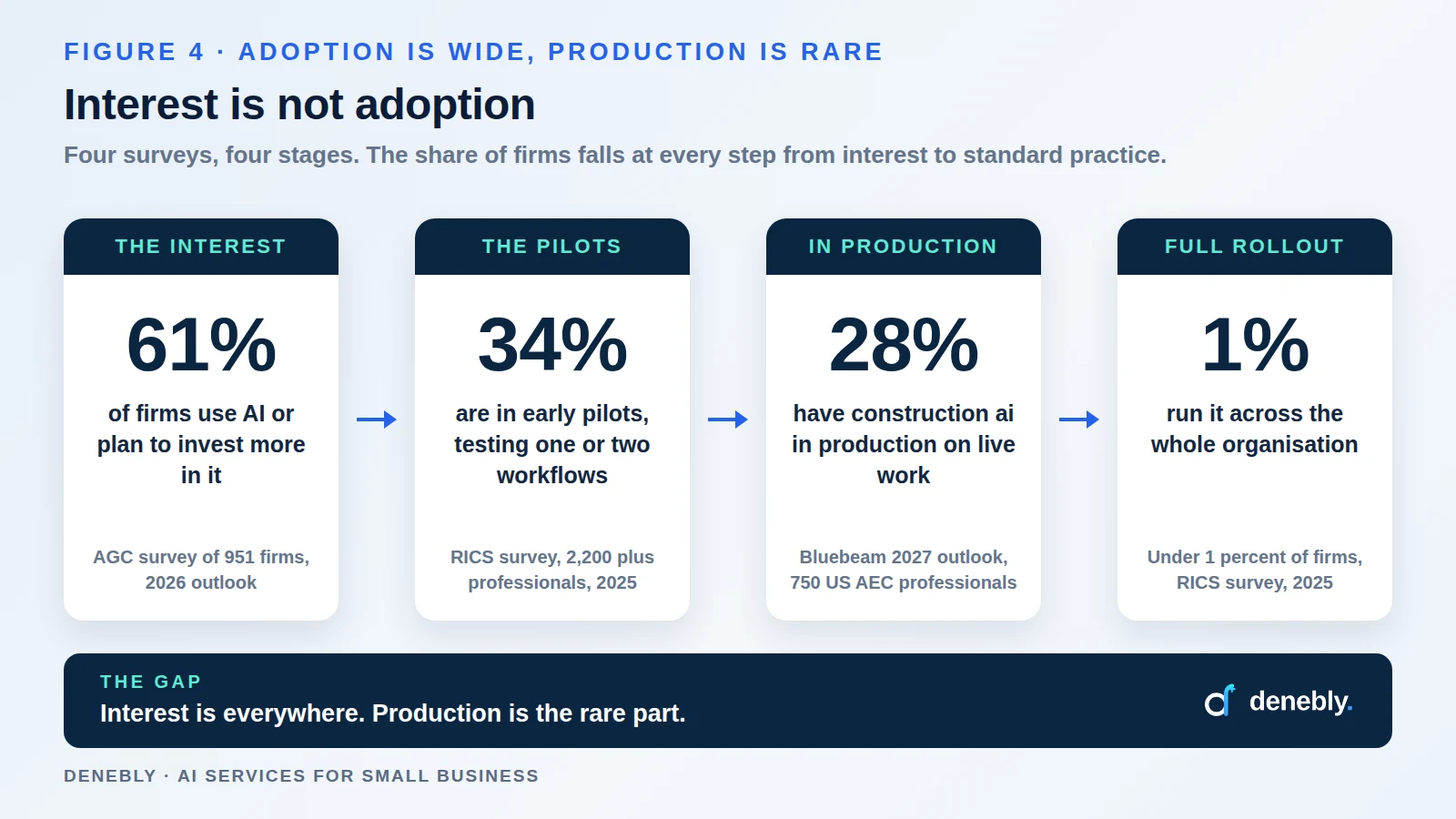
The honest starting point is how early this still is. Bluebeam’s 2027 AEC Technology Outlook, published in October 2026 from a survey of 750 US AEC professionals, found only 28 percent with construction ai in production and 7 percent across several core workflows.
If you would rather pick that first workflow with help, our AI automation services team does this work with trade and field service businesses. The full method is below either way.
What construction ai covers
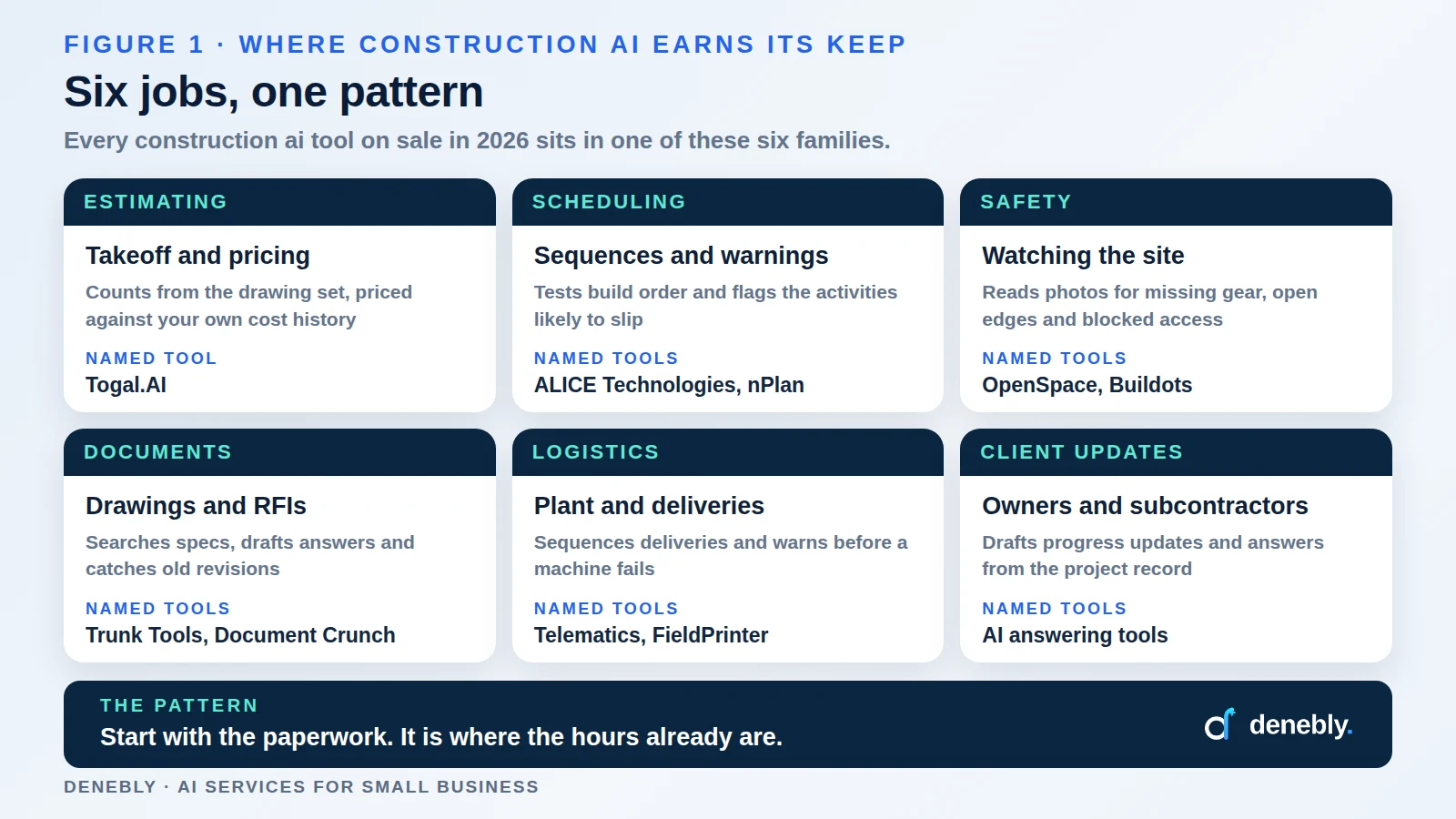
Six job families account for nearly every tool on sale in 2026.
- Estimating and takeoff. Reading drawings, counting quantities, pricing the count against your own cost history.
- Scheduling. Testing sequences, flagging slips, rerunning the plan when a delivery moves.
- Safety monitoring. Reading photos and video for missing protective gear, open edges and blocked access, then alerting a person.
- Documents, drawings and RFIs. Searching specs and drawings, drafting RFI and submittal answers, catching a superseded revision before it reaches the field.
- Equipment and site logistics. Sequencing deliveries around site access, tracking plant, flagging a machine that needs service before it fails.
- Client communication. Drafting progress updates, meeting notes and owner question answers from the project record.
The boundary matters. Construction ai does not own your estimate, and its quantities are drafts until an estimator checks them against the current drawing revision. It does not certify a site as safe. Ordinary software stores the record. These tools read it and draft from it. A named person decides.
Three kinds of construction ai, and where BIM fits
Vendors sell one word for three different machines, and the difference decides what a tool can do.
- Predictive tools read past project data and forecast what happens next, such as which activities are likely to slip.
- Computer vision reads site photos and video and reports what the camera saw, from missing protective gear to work not in place.
- Generative tools draft new material from the project record, an RFI answer, a daily log summary, a client update.
None of the three replaces BIM or the project platform. The platform holds the record, and the AI layer works on top of it.
Estimating, takeoff and the bid decision
Estimating changes first because the input is a drawing set and the output is a count a senior estimator can check line by line. Togal.AI reads 2D plans and returns measured spaces, walls and objects for the estimator to price. The gain is not the count itself, it is bid volume. A two person desk turning takeoffs around in days instead of a week bids more work.
Two quieter jobs sit next to the count. Tools compare drawings against the spec and flag scope drawn but not priced, the gap that turns a won bid into a losing job. The same counts feed the bid or no bid decision, because a desk that knows its capacity stops chasing unstaffable work.
Scheduling and delay warnings
Scheduling tools work one step earlier than the crisis. ALICE Technologies takes a schedule from Primavera P6 or Microsoft Project and runs alternative sequences, so a planner can compare recovery options first. nPlan forecasts which activities are likely to slip. Neither owns the plan of record. The scheduler decides.
Documents, drawings and RFIs
Trunk Tools searches across Procore, Autodesk and Oracle Primavera Cloud, so a project engineer finds the answer in one search. Document Crunch reads contracts and specs and flags clauses carrying risk or a notice deadline. The tool reads the pile, a person checks the answer against the source, and senior people stop searching.
Safety monitoring, progress tracking and quality control
OpenSpace captures a site with 360 degree cameras and reports more than 95,000 projects on its platform. Buildots compares hardhat camera images against the BIM model and schedule, flagging work missing or out of sequence, the same feed doing progress tracking and quality control. The failure mode is false alerts. A system that flags safe work as dangerous three times a day gets ignored by Friday. The safety manager still walks the site.
Equipment, site logistics and layout robots
Telematics data, engine hours, fault codes and usage patterns feed service warnings, so a machine gets booked in before it fails on the job. Dusty Robotics sells the FieldPrinter, a robot that prints the BIM layout onto the slab, work crews do with chalk lines and tape measures. No serious vendor sells these narrow machines as a crew replacement.
Design, feasibility and environmental monitoring
Generative design tools test layout and massing options against constraints a designer sets, floor area, light and structure, and return options. Autodesk Forma sits in this space. Camera and sensor feeds log dust, noise and waste movements for compliance records on regulated sites. These tools pay on large, design heavy or regulated projects, and sit last in the buying order.
Office admin, invoices and client updates
Tools draft invoices from the project record, track spend against cost codes and flag budget lines drifting before the month closes. Field staff reach the same record without calling the office, asking for the current spec or last delivery date directly.
Owners and subcontractors ask the same questions every week. What is finished, what is next, why did this change. Tools draft those updates from the project record, and AI answering tools handle routine questions by phone and chat after hours. Contractors who want that covered without adding staff can see our AI chatbot development page.
What the RFI pile costs in hours
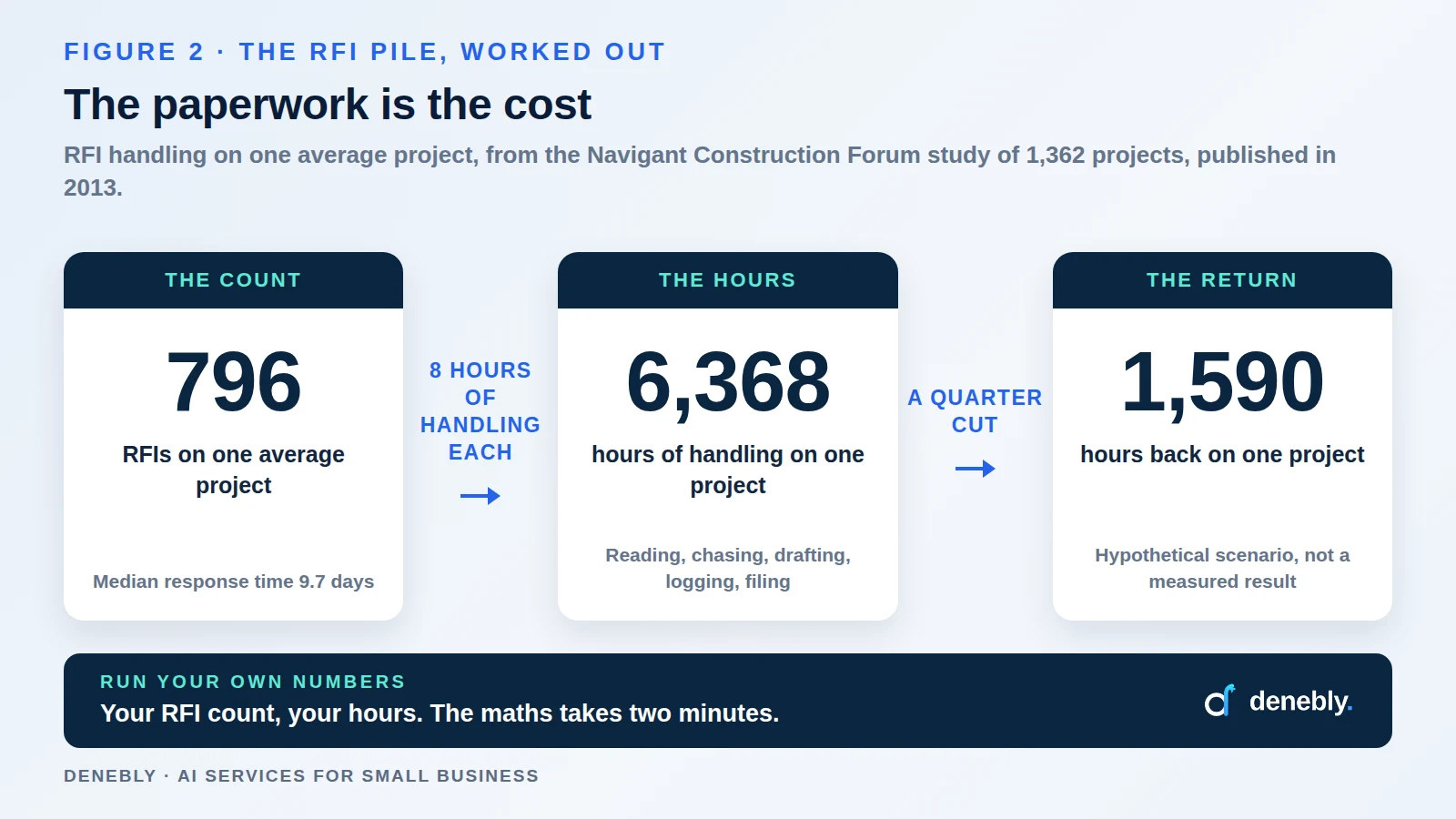
The clearest count of paperwork cost comes from a Navigant Construction Forum study of 1,362 projects, published in 2013. It found an average of 796 RFIs per project, a median response time of 9.7 days, and about 8 hours of handling behind each RFI. The study priced an RFI at about $1,080. Treat that dollar figure as dated. The hours still bite.
796 RFIs at 8 hours each is 6,368 hours of handling on one average project, spread across project engineers, the design team and the office.
Now a hypothetical, labelled as one, not a measured result. Say a document tool drafts the first RFI answer from the spec and current drawings and cuts handling time by a quarter. A quarter of 6,368 is about 1,590 hours back on one project. Your cut will differ. Run the same maths on your last finished job before believing a savings claim from anyone selling software.
Takeoff software makes the same test easier, because Togal.AI prints its price, $299 per user per month on the Growth plan, billed yearly. Three estimators cost 3 times $299 times 12, which is $10,764 a year. The question is not whether the tool counts fast. It is whether three estimators win one extra bid a year because takeoffs stopped being the bottleneck. Win it and the seats are cheap. Bid the same volume and you bought a faster route to the same losses.
The tools, and what they charge
Most construction ai pricing sits behind a sales call. The table prints public prices and marks the rest quote only, checked 17 November 2026.
| Tool | Main job | Published price |
|---|---|---|
| Togal.AI | Estimating and takeoff | $299 per user per month, billed yearly |
| Workyard | Crew time, field forms and admin | From $6 per user per month, billed yearly |
| Autodesk Forma | Design and project platform | $100 to $175 per user per month, per Workyard comparison |
| Procore | Project platform and AI agents | No public price, quote only |
| OpenSpace | Site capture and progress records | No public price, priced on construction volume |
| Buildots | Progress tracking against BIM and schedule | No public price, quote only |
| ALICE Technologies | Schedule scenario testing | No public price, quote only |
| Document Crunch | Contract and spec risk review | No public price, quote only |
Two things matter more than any single row. The platforms price on your construction volume or headcount after a sales process, so the first year cost is a negotiation, not a lookup. Priced tools are the ones a small firm can test this month on one project. When the real gap sits between tools, when the takeoff count never reaches the estimate and the schedule never sees the costs, the fix is a small build joining the systems you already run, described on our custom software development page.
What the first year really costs
The licence is the smallest line in the first year. Price the rest before you sign. This stack is illustrative, built on the one published price. Take the three Togal.AI seats above at $10,764 a year. Add the work nobody invoices you for. Cleaning the drawing set so only current revisions reach the tool can take days of project engineer time. Training each estimator to check AI counts instead of making them takes half a day each. Then the review habit, a senior person reading output before it leaves the office, every week the tool runs.
Budget the licence as roughly half the first year cost, the rest as your own people’s time, then measure both. A firm that budgets only the licence reads the pilot as expensive software. One that budgets the time reads it as a staffing decision.
Adoption is wide, production is rare
The Associated General Contractors of America surveyed 951 firms for its 2026 Construction Hiring and Business Outlook. 61 percent use AI or plan to increase investment in it, up from 44 percent a year earlier, led by office work at 45 percent, estimating at 23 percent and design and preconstruction at 20 percent. Plans count as interest here, not tools on live projects.
The Royal Institution of Chartered Surveyors surveyed more than 2,200 professionals in 2025 and found 45 percent with no AI implementation at all, about 34 percent in early pilots and under 1 percent running it organisation wide. ServiceTitan’s 2026 report on commercial specialty contractors points the other way, with 38 percent reporting measurable business impact, up from 17 percent in 2025. A minority get real results, and the majority are still piloting.
Mastt surveyed construction project professionals in 2026 and found 66.7 percent had used ChatGPT in the past three months, against 3.7 percent who had used the AI inside Procore or Autodesk. Accuracy and trust were the biggest obstacle, named by 29.6 percent, and 84.3 percent said reporting is the job they most want AI to take. Contractors already use AI in the chat window they can check.
Where construction ai does not pay yet
Three situations where the tools do not pay yet. First, drawings in a shared drive with mixed revisions. A document tool reading superseded sheets produces fast, confident, wrong answers. One wrong RFI answer on a live job costs more than a year of licences. Second, safety cameras on a small site whose superintendent already walks it twice a day, adding alerts he has caught already, until false alerts teach the crew to ignore the real ones.
Third, a company wide rollout bought before one workflow proved itself on one project. That is how a firm ends up in the pilot statistics above.
Mistakes that waste the first year
The same mistakes show up on every failed rollout.
- Buying for every project at once, instead of proving one workflow on one job.
- Feeding the tool a mixed revision drawing set, then blaming the tool for wrong answers.
- Letting AI output reach the owner, the architect or the project record with no named approver.
- Counting licences as adoption while the crew still does the work the old way.
- Skipping the insurance question. Carriers began filing generative AI exclusions on contractor liability policies in August 2025, per Trades Coverage reporting, so ask your broker before the rollout, not after a claim.
Data control and the sign-off rule
Your drawings and bid numbers are the business. Before any upload, get written answers to four questions.
- Where are drawings, specs and bid data stored, and in which country.
- Does your data train the vendor’s models, and can that be switched off in the contract.
- Who at the vendor can see site images of your crews and your clients’ buildings.
- How do you get your data back and deleted when the contract ends.
Governance is the second half, and it is one rule. Nothing an AI tool drafts reaches the owner, the architect or the project record without a named person approving it first. The firm whose name is on the submittal owns the error, not the software.
Picking the first workflow
Score every candidate workflow on four questions before trialling anything. Copy this scorecard, fill it in for the three workflows your team complains about most.
| Question | What to count | A strong sign |
|---|---|---|
| Hours per week | Reading, counting and drafting hours eaten today | 10 hours a week or more across the team |
| Cost of one error | What a wrong output costs if it slips past review | A reviewer can catch it before it leaves the office |
| Data ready today | Drawings, specs and logs current and in one place | One current revision set, stored in one system |
| One named owner | Who approves the output and answers for the result | One person, named before the trial starts |
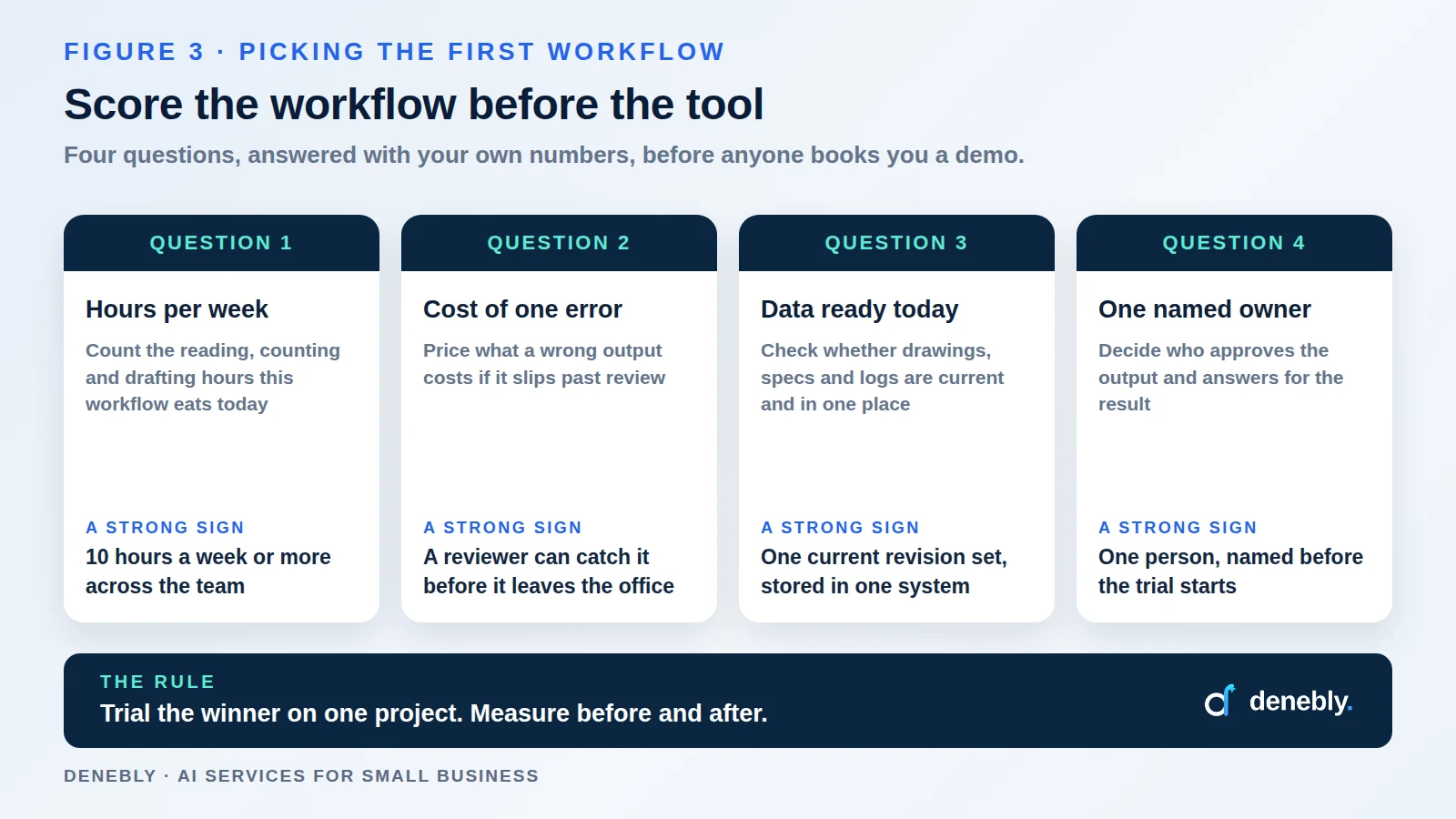
Run the winner on one live project for one full reporting cycle. Write down the hours the workflow took the month before, then measure again after. Count the errors your reviewer caught. A workflow that cannot beat its baseline on a friendly project will not beat it across ten hard ones. A tool that wins on one project has earned its second.
Start with the paperwork
The tools will keep changing names. The order of work will not. Construction ai pays first where the hours already are, in the paperwork, the takeoffs, the RFIs and the daily logs. The same pattern shows up across the home services businesses Denebly works with. Pick the workflow that eats the most hours, prove it on one project, and let the result make the case for the second tool. If you want a second pair of eyes before signing anything, talk to Denebly first.
Questions contractors ask
What is construction ai?
Construction ai is software that reads project drawings, specs, schedules and site images, then drafts, counts, checks or flags work for a person to approve. It covers estimating, scheduling, safety monitoring, document and RFI handling, equipment logistics and client updates. It does not make the final call on cost, schedule or safety.
How much does construction ai software cost?
The prices vendors publish run from $6 per user per month for Workyard Starter to $299 per user per month for Togal.AI Growth, both billed yearly. Procore, OpenSpace, Buildots and ALICE Technologies publish no price and quote on volume or headcount. Budget for setup and training on top of any licence.
Can small contractors use construction ai?
Yes. A small firm starts best with one priced tool on one live project, such as takeoff software at $299 per user per month, and measures the hours saved before buying more. The big platform suites are priced for larger firms, and rarely needed for a first result.
Does construction ai replace estimators?
No. It takes the counting and measuring off the estimator’s desk. The estimator still checks scope, reads the exclusions, sets the price and owns the number on the bid. What changes is how many bids one estimator turns around in a week.
Which jobs does construction ai change first?
Estimating and takeoff change first, then document handling and RFIs, scheduling, progress and safety monitoring, and client updates. Jobs built on reading and counting move first because their output is easy to check. Physical trades and final sign-offs stay with people.
Is jobsite data safe with construction ai tools?
It depends on the setup, so ask before you upload anything. Ask where drawings and bid data are stored, whether your data trains the vendor’s models, and who can see site images of your crews. Keep bid pricing in tools with written data terms, and ask your broker about generative AI exclusions on liability policies, filed from 2025.
How long does construction ai take to set up?
One priced tool can run on a live project inside a week. The licence is never the slow part. Cleaning the drawing set is, and so is naming who approves the output. A firm wide platform rollout runs to months.
Sources
- Togal.AI pricing page, read 17 November 2026. Growth plan price for the takeoff maths.
- Workyard, Best AI Construction Tools in 2026, read 17 November 2026. Workyard and Forma prices, quote only status.
- Kanerika, AI in Construction, read 17 November 2026. AGC and Bluebeam outlook figures.
- TrueLook, AI in Construction Management, read 17 November 2026. ServiceTitan report, Mastt survey, insurance exclusions.
- RottenWifi, AI in Construction, read 17 November 2026. RICS 2025 survey.
- VDF AI, AI for Construction Companies, read 17 November 2026. Navigant RFI study.
- Construction Digital, Top 10 AI Tools in Construction, read 17 November 2026. OpenSpace project count.

WRITTEN BY
Arslan Mushtaq
Founder, Denebly
Arslan founded Denebly in 2018 and leads its AI development work for startups and mid-size businesses, across AI chatbots, agentic workflows, RAG systems, machine learning and automation. Denebly has delivered 100+ projects from Dallas, Texas.
Ready to Solve Your Business Problems With AI?
Tell us what you are trying to build, automate or fix. You will get an honest assessment within one business day, not a sales pitch.