What Are Managed AI Services, the Work a Provider Owns After Launch
A SaaS team ships an AI support assistant in a week, answering customer questions on day one. By month three it quotes a price the company dropped, the model behind it has changed twice, and the engineer who wired it up has moved teams. That gap is the whole job, and what are managed ai services if not the team that closes it.
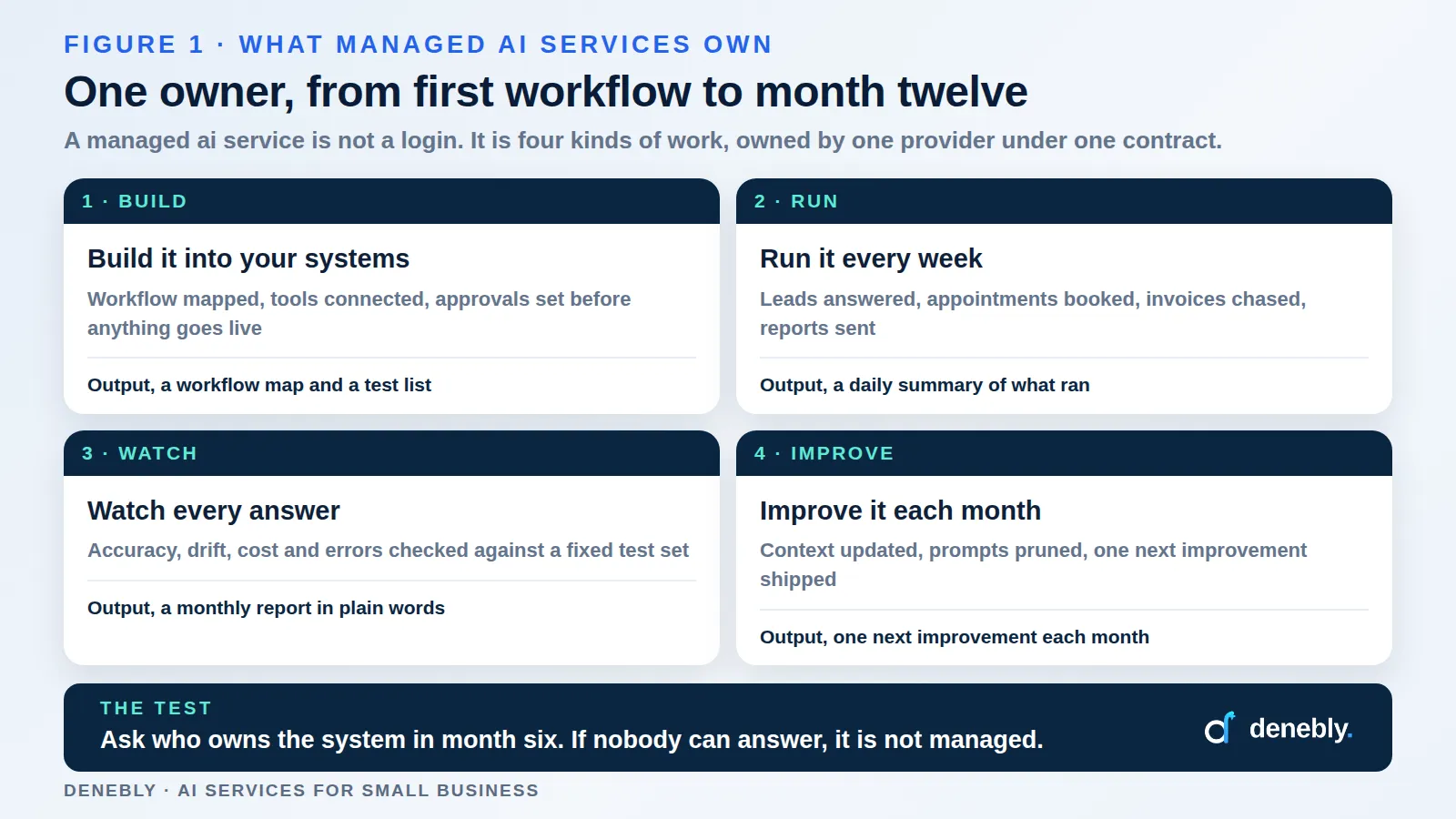
What are managed ai services. A service where one provider builds an AI workflow into a business, then keeps it running, watched, fixed and improved under one contract. The provider owns the setup, the monitoring and the fixes, while the business keeps the decisions and the approvals.
If you would rather hand that job to one accountable team, our AI managed services team runs systems this way.
What are managed ai services
In plain words, what are managed ai services. They are ongoing care for AI tools after launch, the same way a managed IT service looks after servers.
Three parts make the definition hold. First, the provider builds the workflow into the systems in use, email, CRM, support desk and documents, not a login. Second, the provider runs it every week. Third, one named person answers when it goes wrong.
Test any quote with three questions. Who owns the system in month six, who notices a wrong answer first, who fixes it without a new invoice. A vendor that cannot answer in writing is selling a label.
The four models buyers confuse with a managed service
Four different things share the label, and price comparisons mean nothing until you know which one is on offer.
- Model access. Paying per call to a foundation model and building your own application.
- Packaged AI applications. One product that does one job, meeting notes or document extraction.
- A managed platform. A vendor run environment with approved tools, identity and data controls.
- Implementation and consulting. Help choosing use cases and wiring AI in, ending when the build ends.
Only the third model plus real implementation is a managed service. The rest leave the running with you, which is why model access, the first model people mistake for what are managed ai services, looks cheap. The bill is small because the work is yours, every hour spent fixing connections and checking bad answers is a cost the quote never shows.
What a provider actually owns, the eight jobs
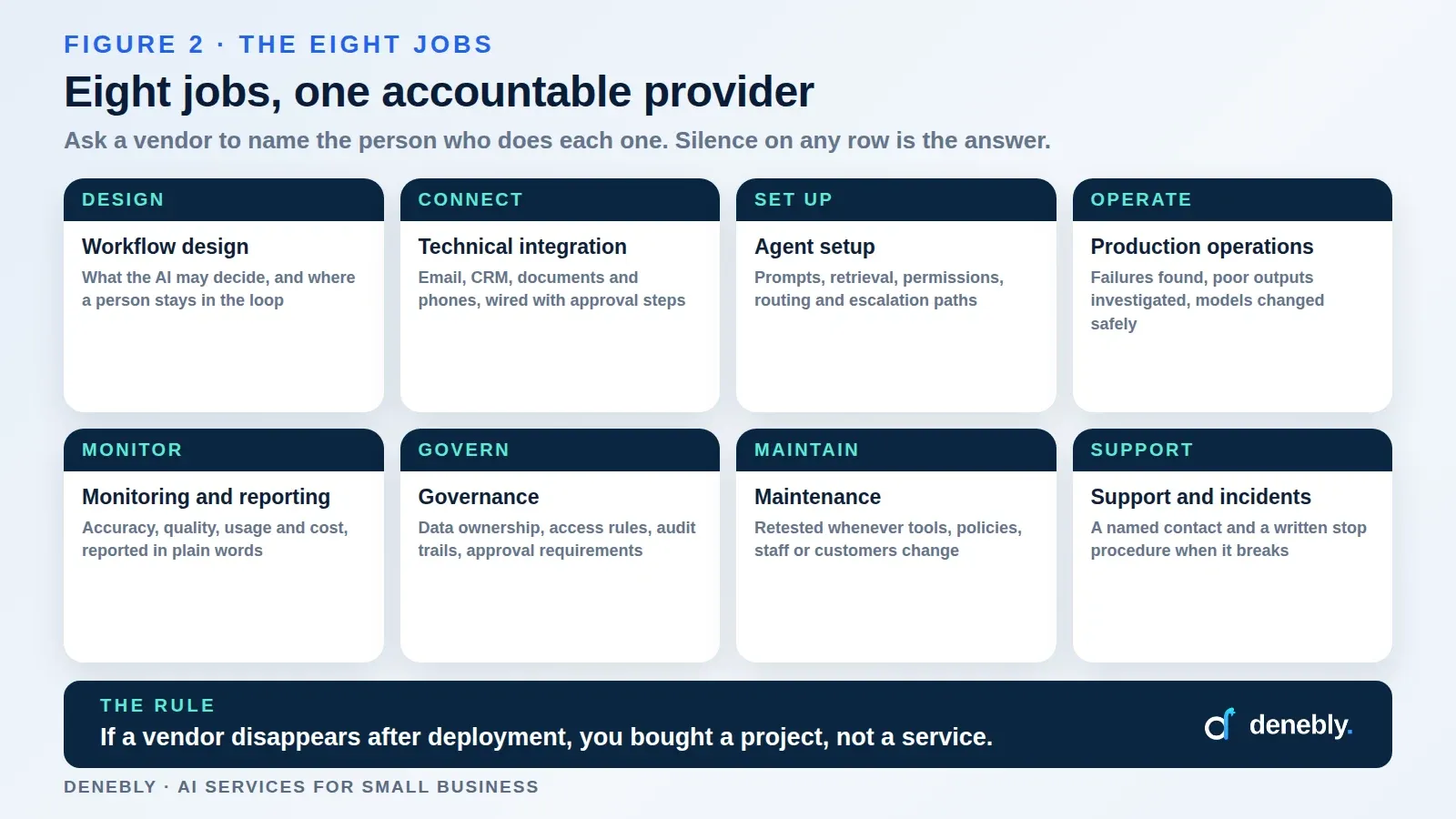
A serious managed service covers eight connected jobs.
- Workflow design. Map the process, name the decisions the AI may take, mark the human checkpoints.
- Technical integration. Connect email, CRM, documents and phones, with approval steps for risky output.
- Agent setup. Manage prompts, retrieval, permissions, routing and escalation paths.
- Production operations. Watch for failures, investigate poor outputs, manage model changes.
- Monitoring and reporting. Track accuracy, quality, usage and cost, and report them monthly.
- Governance. Set data ownership, access rules, audit trails and approval requirements.
- Maintenance. Retest the workflow when tools, policies or staff change.
- Support and incident handling. A named contact and a stop procedure when the system breaks.
That list is the test. If a vendor cannot name who does each job, the word managed in their quote is a label on a project fee. Cyndra adds the line that matters. If a vendor disappears after deployment, you bought a project, not a managed service.
What businesses use managed ai services for, the first six jobs
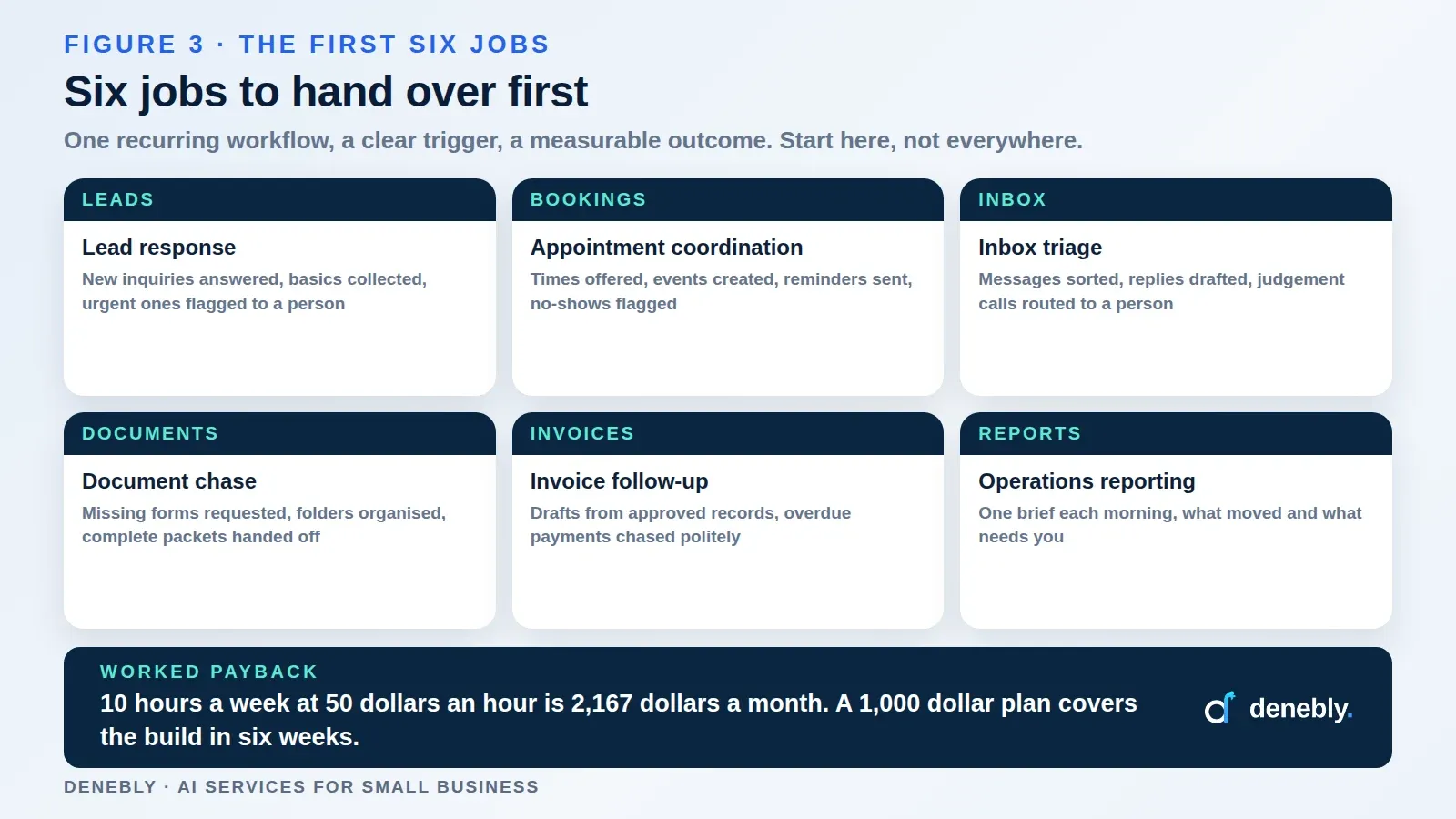
The uses follow one pattern, a recurring workflow with a clear trigger and a measurable outcome. These six are the usual first picks.
- Lead response and follow-up. Answer a new inquiry, collect the missing basics, alert a person when the lead is urgent.
- Appointment coordination. Offer approved times, create events, send confirmations and reminders, flag non responses.
- Inbox and support queue triage. Sort the inbox or support queue, summarise messages, draft replies, route judgement calls to a person.
- Document and onboarding collection. Request missing forms, files or setup data, organise approved folders, hand off a complete packet. New customer onboarding runs on this job in most SaaS teams.
- Invoice preparation and follow-up. Draft from approved records, ask for missing details, send only under the business rules.
- Recurring operations reporting. Collect approved metrics, summarise changes, flag missing inputs, deliver one brief.
The pattern across all six is the same. The AI drafts, sorts and chases, and a person approves anything that goes out under the company name. Our generative AI services cover the drafting side, and our guide to generative AI for social media content shows the same split on posting.
Managed ai services for SaaS companies
A SaaS company runs AI in a harder place. The assistant sits inside the product or on the support queue for paying customers, so a wrong answer is a product defect, not an admin slip, and usage growth moves cost, quality and load together. Managed ai services for a SaaS company means the provider owns the watching, wired into the help desk, billing system and product database, and retested whenever the product or model changes. The team keeps the roadmap and pricing decisions. The provider keeps the AI working against them.
The jobs a SaaS team hands over first
Five jobs come first in most SaaS engagements, each with an owner already carrying too much of it.
- Support ticket deflection. The AI answers repeat questions from approved help centre content, and passes anything uncertain to an agent, conversation attached.
- Customer onboarding. The AI chases setup steps, data imports and first value milestones, and flags stalled accounts before a person would notice.
- Churn signals. Usage drops, failed payments and angry tickets are gathered into one weekly list for the customer success team.
- Usage analytics summaries. Product usage becomes a weekly brief, what grew, what fell, which accounts changed behaviour.
- Billing question drafts. Plan, invoice and seat questions are drafted from the billing record, and a person approves any price quote.
Each is judged on tickets closed without an agent, accounts reaching first value, and cost per conversation.
What changes for a SaaS team
Three things change inside the team. Maintenance leaves the roadmap, because model updates, prompt fixes and retests sit with the provider. Releases get a gate, because each version is tested against the support answers before it ships. And the monthly report changes language, from hours saved to deflection rate, reopened tickets and cost per resolved ticket.
Run the deflection maths on a real queue. A queue of 2,000 tickets a month, 30 percent answered safely by the AI, removes 600 tickets. At 6 dollars handling per ticket, that is 3,600 dollars a month avoided, before counting agents freed for hard cases. The figures are a worked example, so run them with your own numbers.
How pricing works, build fee plus monthly run fee
Every quote for what are managed ai services splits into two costs, getting the system running and keeping it running, a setup fee and a recurring charge for patching, monitoring and support. Grand View Research puts the market at 93.26 billion dollars in 2025, and a KPMG 2026 survey found 91 percent of companies using managed services to deploy AI at scale.
| Service model | Typical cost range | What the range covers | Best for |
|---|---|---|---|
| Project based implementation | 15,000 to 100,000 dollars plus | One defined workflow or integration | A stable workflow your team can run after handover |
| Ongoing managed service | 5,000 to 25,000 dollars a month | Monitoring, optimisation, governance and support | A system touching revenue, customers or regulated data |
| Small business managed system | 1,000 to 3,000 dollars a month, plus 500 dollars per module to build | Named admin modules run by one person | An owner run business with admin spread across several tools |
The rows come from the Cyndra guide, market oriented structures, not a universal price list. The third row carries Results2Go prices, 500 dollars per module to build, then 1,000 a month for three modules, 2,000 for seven, 3,000 for fifteen.
A worked monthly cost, three sizes of company
The table uses published prices only, Results2Go module prices for the two smaller companies, Flywheel from 5,000 a month for the larger one.
| Company | Build cost | Monthly run cost | Year one total |
|---|---|---|---|
| Small SaaS team, 3 modules | 1,500 dollars | 1,000 dollars | 13,500 dollars |
| 40 person SaaS company, 7 modules | 3,500 dollars | 2,000 dollars | 27,500 dollars |
| 200 person SaaS company, agent swarm | Audit included in onboarding | 5,000 dollars from | 60,000 dollars from |
Year one totals are build plus twelve months of run fee, 1,500 plus 12,000 is 13,500 dollars for the small team, 3,500 plus 24,000 is 27,500 for the 40 person company, and 60,000 at the starting rate for the largest.
Those rows are the shape of the decision, not a quote. For your own numbers, our AI automation services team starts with a use case review on your real workflows.
How to measure whether the service pays, worked payback
A managed service pays when the hours it removes are worth more than the fee. Run the Results2Go worked example below before comparing quotes.
Ten hours a week of admin at 50 dollars an hour is about 2,167 dollars a month of owner time. The three module plan costs 1,000 a month after a 1,500 dollar build. The saving is about 1,167 a month, so the build is covered in about six weeks. The same ten hours from a US based virtual assistant, at 20 to 40 dollars an hour, would cost roughly 870 to 1,730 dollars a month.
Run the same maths with your own numbers. Count the hours the workflow eats today, multiply by the hourly cost of the person doing it, and compare with the fee plus the build spread over twelve months. Time freed is not automatically cash saved.
Monitoring that catches bad answers before customers do
Pre-deployment testing tells you less than most vendors claim. In March 2026 NIST published a report on monitoring deployed AI systems, finding that testing in controlled settings does not predict behaviour on real, messier data, and calling post-deployment monitoring methods still nascent, with no settled industry wide terms yet.
The answer is a monitoring list agreed before launch. The NIST AI Risk Management Framework organises the work under Govern, Map, Measure and Manage, and the NIST AI Risk Management Framework Playbook turns those headings into actions.
- Answer quality. Accuracy and response quality against a fixed test set.
- Drift. Data drift and model drift, the slow slide one test never catches.
- Reliability. Error rates, latency and uptime of the workflow, not only the model.
- Behaviour. Tool use, agent actions and escalation quality, because an acting agent needs watching.
In a SaaS support queue the same list reads as product risk, a drifting answer puts a wrong plan detail in front of a paying customer, so the test set is rebuilt from real tickets monthly.
Data rules, access and the training question
The first question to ask any provider is the simplest. Are prompts, files and outputs used to train any model. The answer should be no, in writing, in the contract. A vendor that hedges here is telling you how it treats your data.
Access follows the email rule, least privilege, and the same onboarding and offboarding process. The system gets only the records its workflow needs, and a departing contractor loses AI access when they lose everything else. Smarter Systems GH reviews access every quarter. In a SaaS company the provider sits on the sub processor list, beside every vendor that can touch customer data.
Agree the retention on prompts and outputs, and what happens at contract end. Can you export your prompts and data, or do they stay with the vendor. That decides whether what are managed ai services leave you free to walk away, or rent you a system forever.
The readiness check, five signs you are ready and three you are not
The check below answers whether what are managed ai services fit your company now. Five signs you are ready.
- AI already does real work, replies, proposals, quoting, reporting, and the team depends on it daily.
- You run several AI tools, several people use them, and nobody owns the picture.
- Your team works around the AI as often as with it, reworking answers or reverting to the old way.
- You are not confident the answers are accurate, safe with your data, or used as intended.
- A wrong answer would reach a customer or a payment before anyone noticed.
Three signs you are not ready yet.
- Nothing built yet and no workflow in production. Start with an audit, not a monthly plan.
- Your processes live in people heads, with no written steps.
- You want a one off experiment with no plan for production. A workshop fits better.
Office Solutions IT lists the first four ready signs, Smarter Systems GH the not ready signs. A provider that sells a retainer to a company showing them is selling a contract, not a service.
The first 90 days, a launch plan with outputs
A managed service should arrive with a dated plan, not a promise. Flywheel Consultancy publishes its shape, a Phase 0 audit, a first build in four to eight weeks, production within five to ten weeks.
- Weeks 1 to 2, audit the current state. The provider documents your systems and access, and agrees what counts as urgent. Output, a written baseline naming the first workflow.
- Weeks 3 to 4, design the first workflow. Map the trigger, the records it reads and the approval step. Output, a workflow map and a test list.
- Weeks 5 to 8, build and test. Connect the tools, run normal cases and missing inputs, fix what fails. Output, a tested workflow in watch only mode.
- Weeks 9 to 10, go live with a person watching. The system drafts and acts inside its approval boundary. Output, a daily summary of what ran.
- Weeks 11 to 13, review and set the rhythm. Count hours returned, check answer quality, agree the report. Output, a one page review.
Our AI automation services team runs the same shape for clients, starting with the audit and the first workflow, then pricing the build and the run fee.
The contract, eight lines to get in writing
Use this checklist for every quote. Do not infer a response time guarantee from the word managed. Clover Digital lists these eight deliverables, and NIST organises the risk work under Govern, Map, Measure and Manage.
- Workflow map. Trigger, source records, output and exclusions.
- Access register. Account owner, permissions and the revocation path.
- Acceptance tests. Normal cases, duplicates, missing inputs and rejected actions.
- Approval policy. Reviewer, permitted actions and timeout behaviour.
- Operating log. Completed, failed, held and corrected work.
- Incident plan. Named contact, stop procedure and recovery responsibilities.
- Maintenance scope. Tool changes, retesting, and separately quoted change work.
- Exit plan. Export, documentation, retained data and removed access.
Add two lines. Who owns the outputs, prompts and configuration you build together, and what happens when a model is deprecated.
Mistakes that cost buyers money
- Buying a licence and calling it managed. A login with no owner, monitoring or fix path is software, and the renewal arrives with no data behind it.
- Skipping the baseline. Without a written record of how the work ran before, nobody can prove any hours were returned.
- No approval boundary. A system that can send, pay or file without approval is a dispute waiting in the inbox.
- Comparing quotes on price alone. A 1,000 dollar month excluding integration and exit work costs more than a 2,000 dollar month including them.
- Letting the provider own your prompts and data. If your configuration stays locked to the vendor, leaving costs a rebuild.
Each is cheap to prevent and expensive to fix. If you want a second pair of eyes on a quote, start through our contact page and bring the quote.
Frequently asked questions
What are managed ai services
A managed AI service is a contract where one provider runs an AI system after launch, watching the answers, fixing breaks and reporting monthly, while the business keeps policy and approvals.
How much do managed ai services cost
Published prices in 2026 run from 1,000 to 3,000 dollars a month for a small managed system, and 5,000 to 25,000 for larger services and SaaS teams running several workflows, plus a one time build fee.
How are managed ai services different from AI consulting
Consulting ends with a plan your team runs. A managed service owns the running after launch, monitoring, fixes and support, under a monthly contract.
Do I need a managed AI service if my team already uses ChatGPT
Using a chatbot is not running a managed system. Who watches the answers, and who fixes it when a model changes. If nobody inside owns those jobs, the service fills the gap.
What should a managed AI contract include
Eight lines, a workflow map, an access register, acceptance tests, an approval policy, an operating log, an incident plan, a maintenance scope and an exit plan. Add data ownership and the training answer.
Who owns our data and prompts when the contract ends
That depends entirely on the contract, which is why the question belongs in it before signing. Ask whether you can export prompts and data, and the notice the provider must give.
Sources
- Grand View Research, managed AI services market outlook, as quoted by Cyndra.
- KPMG, 2026 report on accelerating AI with managed services, survey figures as quoted by Cyndra.
- National Institute of Standards and Technology, monitoring deployed AI systems, March 2026, and AI Risk Management Framework.
- Vendor pages checked 18 November 2026, Results2Go, Flywheel, Parker Data and Voice, Clover Digital, Office Solutions IT, Monarch, Smarter Systems GH.

WRITTEN BY
Arslan Mushtaq
Founder, Denebly
Arslan founded Denebly in 2018 and leads its AI development work for startups and mid-size businesses, across AI chatbots, agentic workflows, RAG systems, machine learning and automation. Denebly has delivered 100+ projects from Dallas, Texas.
Ready to Solve Your Business Problems With AI?
Tell us what you are trying to build, automate or fix. You will get an honest assessment within one business day, not a sales pitch.