AI Workflow Builder, How to Pick One and Build Your First Automated Process
A bookkeeping firm gets 40 new lead forms a month. Each one waits while someone reads it, writes a reply and files the details in the CRM. The work is honest and it eats a full working day every month.
An ai workflow builder is a tool that turns a plain language description into a running automated process. You describe what should happen, the builder assembles the trigger, the steps and the actions, and the process runs on its own each time the trigger fires.
An ai workflow builder is worth using when one task repeats every week, follows the same steps and needs a judgment call a model can make from written rules. Draw the workflow on paper first, build the smallest version that runs, and keep a human check on every message that reaches a customer.
If you would rather have the first workflows built for you, our SEO services for small businesses include AI search optimization and the workflow automation that supports it.
What the term covers, and what it does not
Three different products share the name, and buying the wrong one wastes the budget. A no-code builder connects apps with triggers and actions. An AI step inside it reads, classifies or drafts at one step. An agent takes a goal and works out its own steps.
The test is simple. If the process is fixed and repeats the same way, a builder is the right buy. If the work changes shape each time, an agent fits better. Vellum makes the same split in its 2026 guide.
Just as useful is what the tool is not.
- It is not a chatbot. A chatbot answers a visitor. A builder moves work between systems while nobody watches.
- It is not a replacement for the process. A messy process automated badly just makes the same mistakes faster.
The three generations of workflow tools
Aerostack frames the category in three generations. Each generation keeps the one before it and adds a layer.
| Generation | What it runs | Strength | Weakness |
|---|---|---|---|
| Gen 1, linear chains | One trigger, fixed steps | Simple and cheap to start | Breaks when a decision appears |
| Gen 2, visual builders | Branching, loops, code steps | Handles real processes | No judgment, paths drawn by hand |
| Gen 3, AI-native orchestration | Agent loops, guardrails, approval gates | Decides and waits for a person | New, thin track record, vendor risk |
The decision the table forces is about your work, not the marketing. A firm with fixed intake forms lives happily on generation 2. A firm where every lead needs a different reply needs generation 3, or an agent.
One warning travels with generation 3. The vendors are young. Relay.app shut down in September 2026 and Pipedream Workflows shuts down on 31 March 2027. Pick a builder you can leave before you build anything that matters on it.
The five parts every AI workflow shares
Every AI workflow, on any tool, has the same five parts. Zoho lists seven by splitting the decision and the review apart, but the shape is the same.
| Part | What it does | Example in a lead workflow |
|---|---|---|
| Trigger | Starts the run | A new form lands on the website |
| Input | Gathers the facts | Name, email, service, budget range |
| AI step | Reads, classifies or drafts | Scores the lead and drafts a reply |
| Decision | Picks the next path | Hot lead to a person, cold lead gets email |
| Action | Moves the result | CRM updated, reply sent, Slack note |
Only one of the five is AI. The rest is plumbing, and the plumbing decides whether the workflow survives contact with real data. A workflow that fails usually fails at the input, a missing field or a form that skips the budget question.
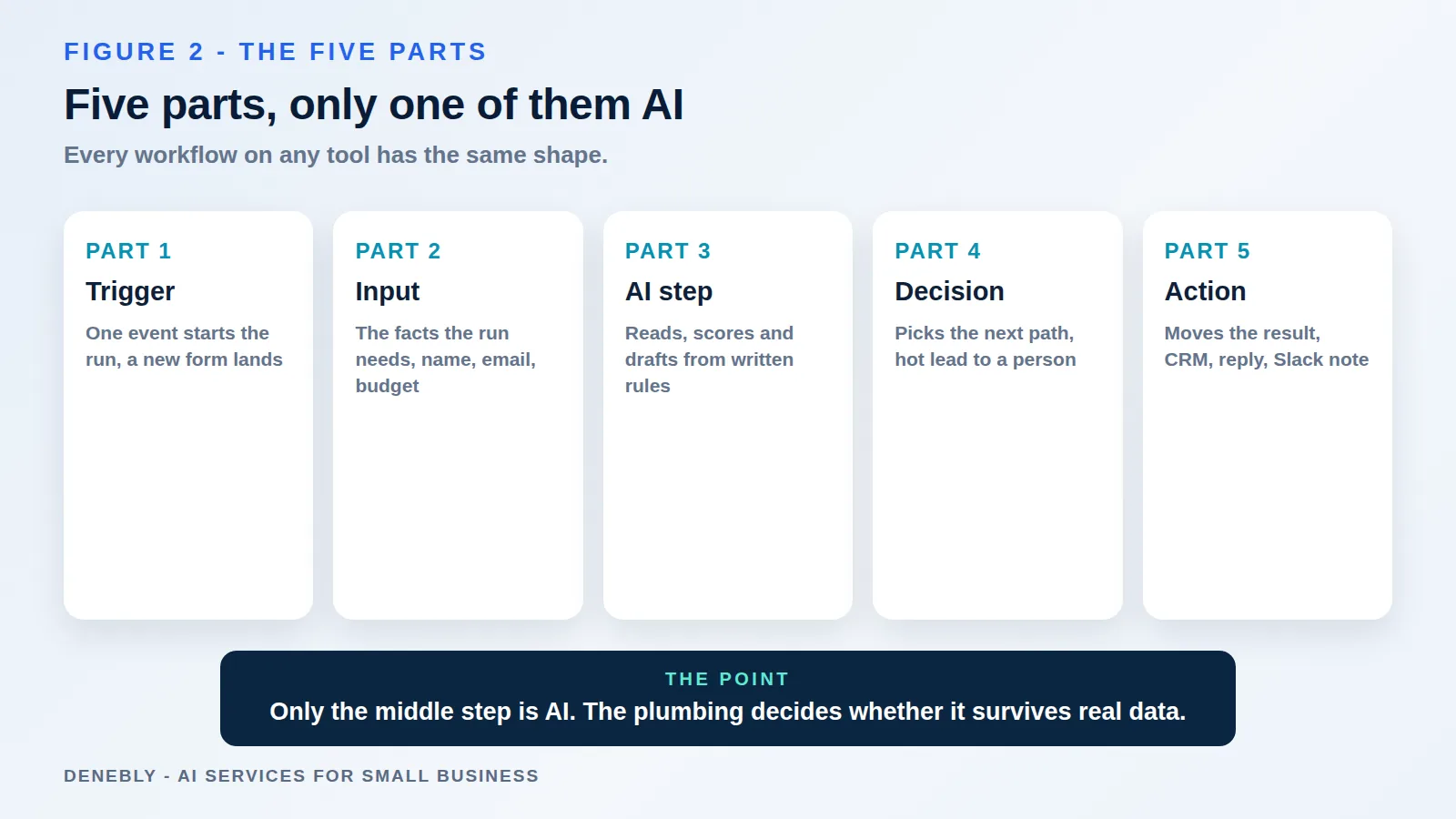
The five parts of an AI workflow. Only the middle step is AI.
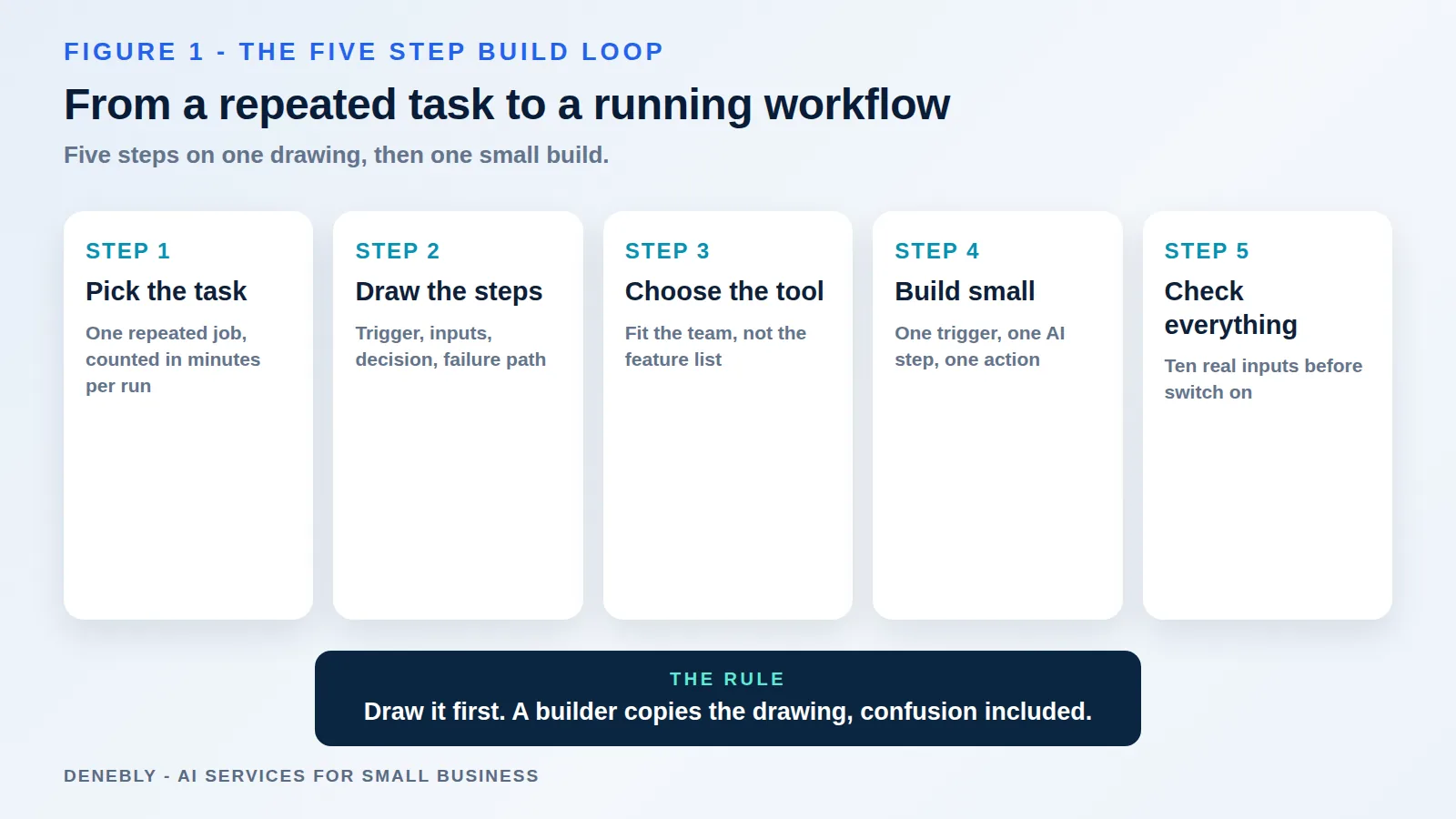
Step 1, pick one task you repeat every week
Write down the tasks you repeat every week, then score each one on three questions. How often does it happen, how long does it take, and how much judgment does it need.
A good first pick is boring. Lead follow up, invoice chasing, meeting notes, review requests. A bad first pick touches money movement, legal wording or a customer complaint.
Brightline Bookkeeping, a fictional six person firm used through this article, picked lead follow up. Forty forms a month, twelve minutes each by hand, same steps every time.
Output, one named task with its weekly count and its minutes per run written down.
Step 2, draw the workflow on paper first
Draw the workflow on paper before you open any tool. Boxes for steps, arrows for paths, a diamond where a decision splits the flow. If you cannot draw it, the builder will not fix that.
Mark three things on the drawing. Where the data comes from, where a human must approve, and what happens when a step fails. Most first workflows skip the failure path, then send a half finished reply to a real customer.
Copy this check into your notes before you build.
- The trigger is one event, written in one sentence.
- Every input field the AI step needs is named, with a fallback when it is blank.
- The decision rule is written as a sentence a new hire could follow.
- The failure path is drawn, with a named person to tell.
Output, a one page drawing with the trigger, the inputs, the decision rule and the failure path marked.
Step 3, choose the builder that fits the job
Choose the builder after the drawing, never before. The drawing tells you what the tool must do.
| Team | Pick first | Why it fits | Watch out for |
|---|---|---|---|
| Non-technical team, few apps | Zapier | Largest app library, Copilot drafts steps | Bills per task, long workflows cost more |
| Visual builder on a tight budget | Make | Cheapest full canvas, AI helper builds it | Every step uses credits, fast schedules add up |
| Technical team that wants control | n8n | Self-hosted free tier, code steps, AI nodes | Setup and upkeep sit with your team |
| Agent-first, few fixed steps | Gumloop or Lindy | Agents decide and act, approvals built in | Gumloop has no free plan, Lindy bills per user |
Two questions cut the list faster than any feature table. Does the builder connect the apps you already use, and does it let a person approve a step before a message goes out.
When the AI step must return data your next step can read, the output needs a fixed shape. Our guide to structured outputs explains how to ask a model for fields instead of free text.
Four team shapes, four first picks. The drawing from step 2 decides which row is yours.
Step 4, build the smallest version that runs
Build the smallest version that runs end to end. One trigger, one AI step, one action, one place for the result. The DEV Community guide calls this the smallest version.
Make has an AI helper called Maia, still in beta, which draws the whole scenario from a plain English description. LeadConnector has an AI Builder that does the same from a prompt. Use the generated draft, then read every step before you trust it.
Build it in this order.
- Connect the trigger and watch one real event arrive.
- Add the AI step with a short prompt and a fixed output shape.
- Add one action that saves the result where you can see it.
- Run it five times on real inputs before you add a second action.
Output, a running workflow with one trigger, one AI step and one action, tested five times on real inputs.
Step 5, check every step before you switch it on
Check everything the AI built before you switch it on. Run the workflow on ten real inputs and read every output yourself. The DEV Community guide puts the same rule first.
| Check | Pass rule |
|---|---|
| Trigger fires once per event | Ten test events give ten runs |
| AI output follows the fixed shape | Ten outputs parse without a hand fix |
| Wrong inputs fail safely | A blank budget field stops the run |
| Customer message approved | No message leaves without approval |
| Cost per run is known | Ten runs cost what the plan maths predicted |
If any check fails, fix it and run the ten tests again. Switching on a workflow with a known failure is how a firm emails a customer a draft that was never meant to leave.
What the leading tools charge, and how they bill
Prices below come from the Noca, Assembly, Viktor and Recaply roundups read on 24 November 2026, which cite vendor pricing pages checked in October and November 2026. All paid prices are annual billing, monthly billing costs more.
| Tool | Free plan | Paid from | Billing unit |
|---|---|---|---|
| Zapier | 100 tasks a month | 19 dollars 99 a month | Per task |
| Make | 1,000 credits a month | 9 dollars a month | Per operation |
| n8n | Self-hosted Community Edition | 20 euros a month | Per execution |
| Gumloop | 14 day trial, no free plan | 37 dollars a month | Per credit |
| Lindy | 50 dollars of credits for 7 days | 29 dollars 99 per user a month | Per credit |
| Microsoft Power Automate | None on the Premium plan | 15 dollars per user a month | Per flow run |
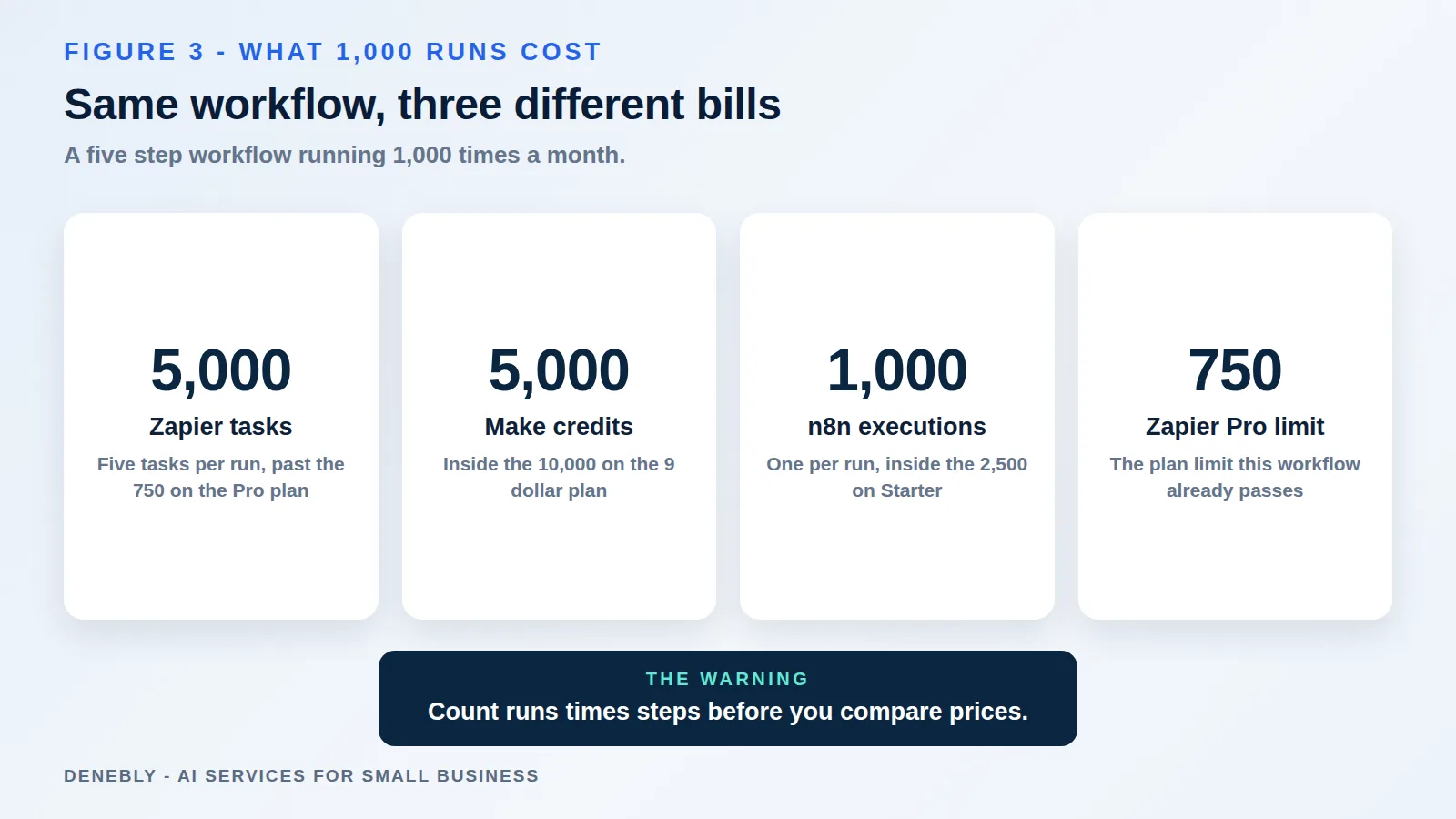
The billing unit matters more than the sticker price. Take a five step workflow that runs 1,000 times a month. On Zapier each run is five tasks, so the month uses 5,000 tasks, far past the 750 tasks on the 19 dollars 99 plan. On Make the same runs use about 5,000 credits, inside the 10,000 on the 9 dollars plan. On n8n each run is one execution, so the month uses 1,000 executions, inside the 2,500 on the 20 euros plan.
The same sum flips for short workflows. A two step workflow running 400 times a month uses 800 Zapier tasks, near the 750 task limit, and 800 Make credits, far inside the free 1,000.
A worked example, the lead follow up workflow
Brightline Bookkeeping is fictional, and every number below is labelled illustrative. The firm gets 40 lead forms a month. By hand, each lead takes 12 minutes, read the form, check the sender, draft a reply, file the details. Forty leads at 12 minutes is 480 minutes, eight hours a month.
The workflow runs five steps. A new form triggers the run. The AI step scores the lead and drafts a reply from a fixed template. A team member approves the draft. The approved reply goes out and the CRM updates. The review takes 2 minutes per lead, so 40 leads take 80 minutes a month.
| Stage | By hand | With the workflow |
|---|---|---|
| Read and score the lead | 4 minutes | 0, the AI step scores it |
| Draft the reply | 5 minutes | 0, the AI step drafts it |
| Approve and send | 2 minutes | 2 minutes |
| File the details | 1 minute | 0, the CRM step files it |
| Total per lead | 12 minutes | 2 minutes |
The saving is 480 minus 80, which is 400 minutes, or 6 hours 40 minutes a month. The workflow runs on the Make free plan at about 200 credits a month, five steps times 40 runs, so the cash cost is zero. Add the model bill, a few dollars a month, and the sum still clears easily.
The result holds only while the approval step holds. Remove the human check and one wrong draft wipes out a month of saved time. The approval step is not overhead, it is the product.
The break even sum, manual work against a paid plan
A paid plan earns its price when the minutes it saves cost more than the subscription. At 30 dollars an hour, the Brightline saving of 6 hours 40 minutes a month is worth 200 dollars. A 9 dollars Make plan or a 19 dollars 99 Zapier plan clears that bar many times over.
The sum flips at low volume. Ten leads a month at 12 minutes each is 2 hours, worth 60 dollars at the same rate. A free plan still wins, and a 37 dollars Gumloop plan needs the workflow to save more than an hour a month. Under 15 runs a month, build on a free plan.
Asana reports the same shape at team size. iDO built 8 AI Studio workflows and saved 690 minutes a month, about 11 and a half hours. The saving came from eight small workflows, not one large one.
If you want one real automation worked end to end before you choose, read our guide to appointment automation, which follows the same five step method on bookings.
Human review, where a person must stay in the loop
Three places in a workflow always need a person. Any message that reaches a customer, any step that moves money, and any decision the model makes with low confidence. Aerostack and Lindy both build approval gates for these points.
Set the rule in writing before the first run. A reply goes out only after a named person approves it. A refund or a discount never runs without a person. An unsure lead goes to a person instead of an automated path. Write the rule into the workflow as a gate.
A gate costs minutes a day. Skipping it risks a wrong message sent at scale, the one failure a small firm cannot afford. A workflow without a gate is a draft with a send button.
Mistakes that waste the first month
Most bad first workflows fail in five ways.
- Automating a process nobody has drawn. The builder copies the confusion.
- Starting with the hardest workflow. Pick the boring repeat.
- Skipping the failure path. A blank field should stop the run, not send half a result.
- Letting the AI write to customers without approval. One wrong draft costs a month of saved minutes.
- Buying on the sticker price. Count runs times steps first.
Every mistake above has the same fix, a smaller first workflow with a drawing, a failure path and a human gate.
How Denebly builds AI workflows for clients
Denebly builds AI workflows for small and mid sized businesses, starting with the drawing, not the tool. A first session maps the repeated work and picks one workflow to build first.
The build follows the same five steps in this article, with the approval gates and the failure path written in from the start. The same team builds the AI chatbot development work that often sits at the front of these workflows.
The rule to work by
Draw the workflow first. Build the smallest version that runs. Keep a person on every message that leaves the firm.
Count runs times steps before you buy, because the billing unit decides the price. That is the whole discipline of using an ai workflow builder, and one boring workflow that runs every week teaches more than ten trials.
If you would rather hand the building to a team, let us discuss your project. Write to sales@denebly.com or call +1 (214) 896-2906. The first step is a short call to map the work and name the first workflow.
Frequently asked questions
What is an ai workflow builder
It is a tool that turns a plain language description into a running automated process, with a trigger, steps that move data between apps, and at least one step where a model reads, classifies or drafts. It runs on its own each time the trigger fires.
What do these tools cost each month
Free plans cover small volumes, Zapier from 100 tasks a month and Make from 1,000 credits a month. Paid plans start near 9 dollars a month on Make and 19 dollars 99 on Zapier, billed annually. Count runs times steps first.
Do I need to write code to build one
No, for the common tools. Zapier, Make, Gumloop and Lindy all build from plain language or a visual canvas. Code helps only when no ready step fits, which is where n8n and its code steps earn their place.
How is Zapier different from n8n
Zapier is the easiest start, with the largest app library and billing per task. n8n is the technical pick, with self-hosting, code steps and billing per execution, so long workflows cost far less at volume.
How do I stop the AI from sending a wrong message to a customer
Put a human approval gate before every message that leaves the firm. Test the workflow on ten real inputs first, and send nothing until all ten outputs read correctly.
When should a small business pay someone to build its workflows
When the workflow touches customer messages or money, when the drawing shows more than ten steps, or when the team has tried twice and it still fails.
Sources
- US Census Bureau survey, March 2026, as reported in the DEV Community guide How to Build an AI Workflow. About 55 percent of US workers had used AI on the job for at least one of 11 common tasks. DEV Community guide
- Asana, AI Workflow Automation page, read 24 November 2026. iDO built 8 AI Studio Smart workflows and saved 690 minutes a month.
- Noca, Assembly, Viktor and Recaply roundups, read 24 November 2026. Entry prices and billing units in the pricing table.
- Aerostack product page, read 24 November 2026. Three generations of workflow tools and human approval gates.
- ContentForce, The Best AI Workflow Tools in 2026, read 24 November 2026. Relay.app shut down September 2026, Pipedream Workflows shuts down 31 March 2027.
- Zoho, AI workflow guide, read 24 November 2026. Seven part workflow structure and six build steps.
- LeadConnector help, Workflow AI Builder guide, updated 4 November 2026. AI Builder v3 and three entry points.
- Denebly, Appointment Automation, our guide to automating bookings with the same five step method.

WRITTEN BY
Arslan Mushtaq
Founder, Denebly
Arslan founded Denebly in 2018 and leads its AI development work for startups and mid-size businesses, across AI chatbots, agentic workflows, RAG systems, machine learning and automation. Denebly has delivered 100+ projects from Dallas, Texas.
Ready to Solve Your Business Problems With AI?
Tell us what you are trying to build, automate or fix. You will get an honest assessment within one business day, not a sales pitch.