AI Front Desk, What It Does, What It Costs and How to Set One Up
Your phone rings while you are with a client, then again at lunch, and once more after closing. By the time you call back next morning, the caller has booked with someone else.
An ai front desk is software that answers that first contact for you, on the phone, on chat, on text and on email. It answers the questions you have approved, books the visit into your real calendar, records the lead, and hands anything it should not decide to a person.
An ai front desk answers every first contact, on phone, chat, text and email, from a library of answers you approve. It books visits into your live calendar, records every lead, and hands questions it cannot answer to your team with a short summary. Judge it on bookings made, not on how human it sounds.
If you would rather have the front desk built and run as a service, our SEO services for small businesses include the chatbot and automation work behind it.
What the term means, and what it does not
Start with the job, not the software. A front desk is the first point of contact between a business and a customer, it greets, finds out what the person wants, books or answers, and passes the rest to the right person.
The software version does those same jobs across every channel at once. The word front matters, because it sits at the entrance, before the customer meets anyone on your team.
- It is not a chatbot on your website, which answers questions on one page and stops there.
- It is not voicemail. Voicemail takes a message and hopes someone calls back.
- It is not an answering service of shared human agents, who answer from a script and rarely book into your live calendar.
The test is simple. Does the system finish the job, a booking, a lead, a handover with a summary, or does it only take a message?
Why missed calls cost more than the phone bill
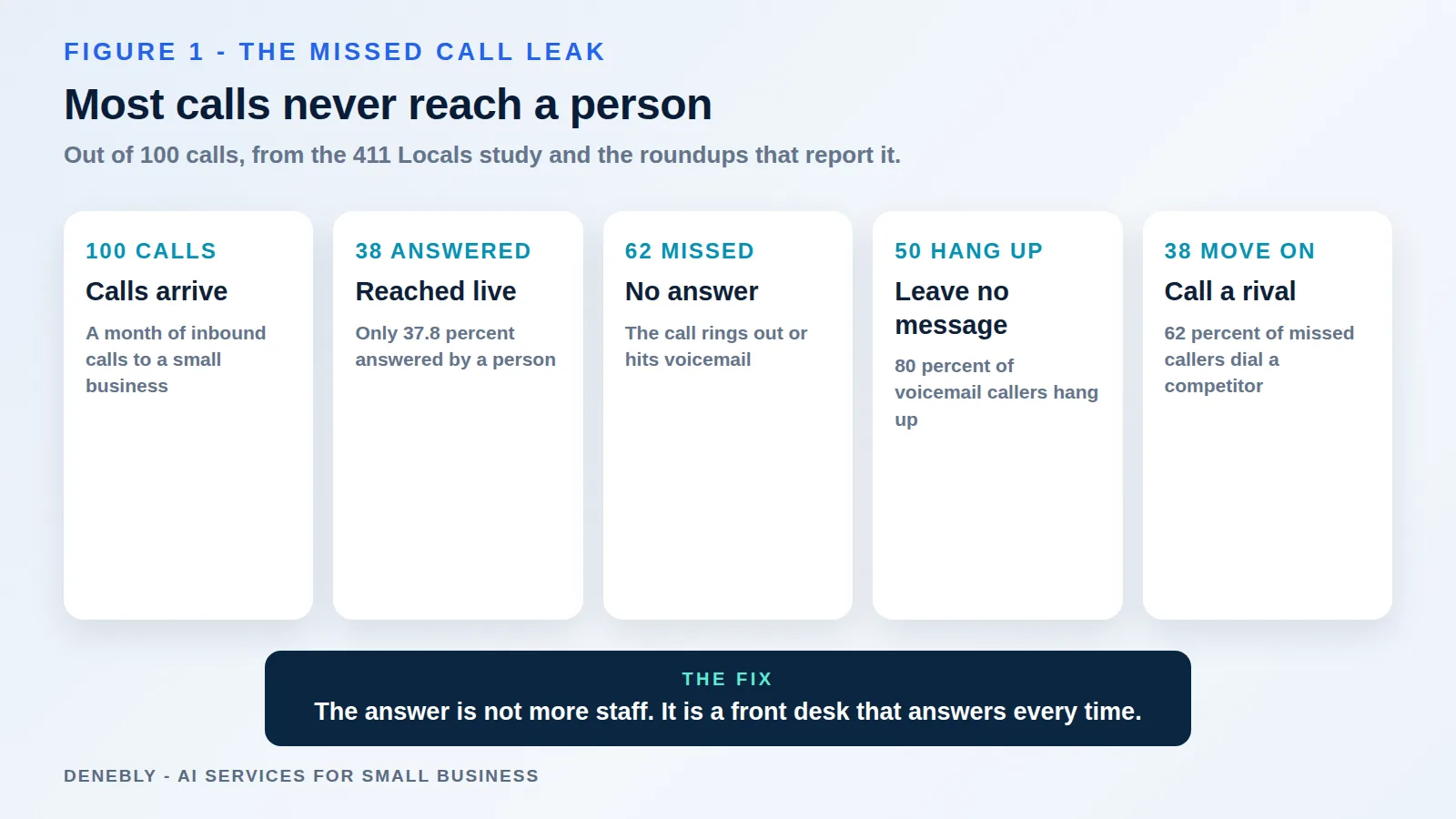
Most owners count the phone bill and miss the bigger number. A 411 Locals study of 85 businesses across 58 industries found only 37.8 percent of calls answered live, so nearly two thirds of callers never spoke to anyone.
What those callers do next is the expensive part. Roundups report that 80 percent of callers who reach voicemail hang up without a message, 85 percent never try the same business again, and 62 percent call a competitor at once.
CallRail put the same pattern in harder numbers in January 2025, from 1.1 million de-identified conversations. Missed call rates ran at 32 percent in healthcare, 28 percent in legal, 14 percent in home services and 9 percent in real estate. Invoca found the same gap across more than 70 million calls in 2026, with only 56 percent of callers speaking to a person.
Here is the loss for a fictional salon. Sixty calls a week, half missed, is 30 missed calls, and if half would have booked at 65 dollars, the salon loses 975 dollars a week, about 4,200 dollars a month.
The five jobs at the entrance
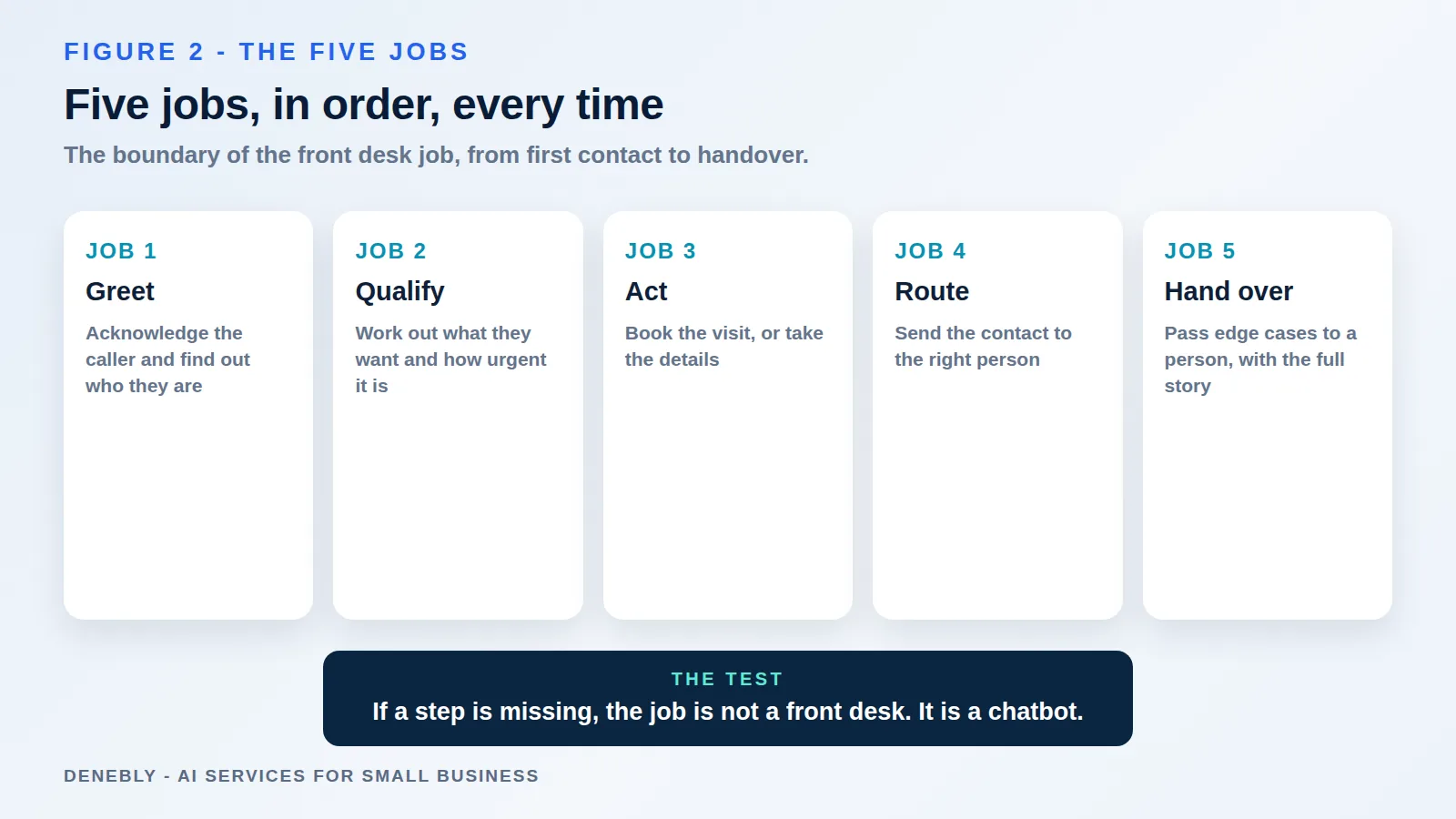
A human receptionist does five things, whatever the industry, and software that claims the front desk job must do the same five.
- Greet, and find out who the caller is when the records allow it.
- Qualify, work out what they want and how urgent it is.
- Act, book the visit, or take the details.
- Route, send the contact to the right person by name, topic or place.
- Hand over, pass the edge cases and the emergencies to a person, with the full story attached.
Twig, a vendor in this market, claims 60 to 80 percent of routine first touch work can be automated.
How it works, step by step
From the customer side it looks like a normal conversation, and from your side it is a short loop with one check per step.
- A message or a call arrives, on any channel you have connected.
- The system reads the approved library for the matching answer.
- It checks anything live, free slots from your calendar.
- It replies in the tone you set once, and offers the slot inside the conversation.
- If the question sits outside the library, it stops and sends your team a summary.
- Every contact lands in your records, with the outcome attached.
Test the loop with your own awkward questions before you pay, a price you changed last month, a service you no longer offer, a booking on a day you are closed. The answers tell you more than any demo call.
What it handles well, and what it must hand over
This software is strongest where a conversation has a known shape, and the table below is the working split.
| Task | What good looks like | What it needs from you |
|---|---|---|
| Routine questions | Hours, location, services, payment methods | A written, current library |
| Booking and rescheduling | Checks real availability, books and confirms | Access to your calendar |
| Message taking | Captures name, number, reason and urgency | A list of required fields |
| Screening and intake | Asks your qualifying questions, filters spam calls | Your intake criteria |
| Routing | Sends the contact to the right person | A directory and routing rules |
| Missed contact follow up | Texts a missed caller and offers a booking | A connection to your phone system |
The other half is the list of what it must never resolve alone. Advice on health, law or money, exceptions and refunds all go to a person, as do anger and emergencies.
TeleCloud, quoted in one ranking guide, offers the rule for the split. If the front desk would need a script to answer it, the software may handle it. If it would need judgment, it should escalate.
Front desk, receptionist, chatbot and answering service, how they differ
Four products share one shelf, and vendors blur the names on purpose, so the table below separates them by who answers and what happens after the conversation.
| Option | Who answers | Where answers come from | Out of hours | Main limit |
|---|---|---|---|---|
| Voicemail | Nobody, until a person calls back | Not applicable | Takes a message | The customer has often moved on |
| Answering service | A trained person, shared across businesses | A script you provide | Usually yes | Rarely books into your live calendar |
| Website chatbot | Software, on one page | Whatever it can generate | Yes | It may produce answers you never approved |
| AI receptionist | Software, voice first | Your approved answers | Yes | Voice only in most plans |
| Front desk software | Software, with your team behind it | Only your approved library | Yes | It cannot decide outside the library |
NolaHaus draws the sharpest line. A chatbot is built to produce a fluent answer to any question, while a front desk system is built to produce a correct answer to the questions you approved.
Who it fits, and who should skip it
It fits businesses where most customers start with a question, and the answer decides whether they book, salons, clinics, dental practices, trades firms and law offices.
It fits best when the team is small and the phone rings while everyone is with a customer, because one missed call is a lost booking.
Skip it if your first contact is almost always a judgment call, a firm that prices every job by eye, or a business where the first question is a negotiation.
Also wait if you have no written prices, hours or policies to load into it, because the system can only repeat what you have approved.
What it costs, three pricing shapes
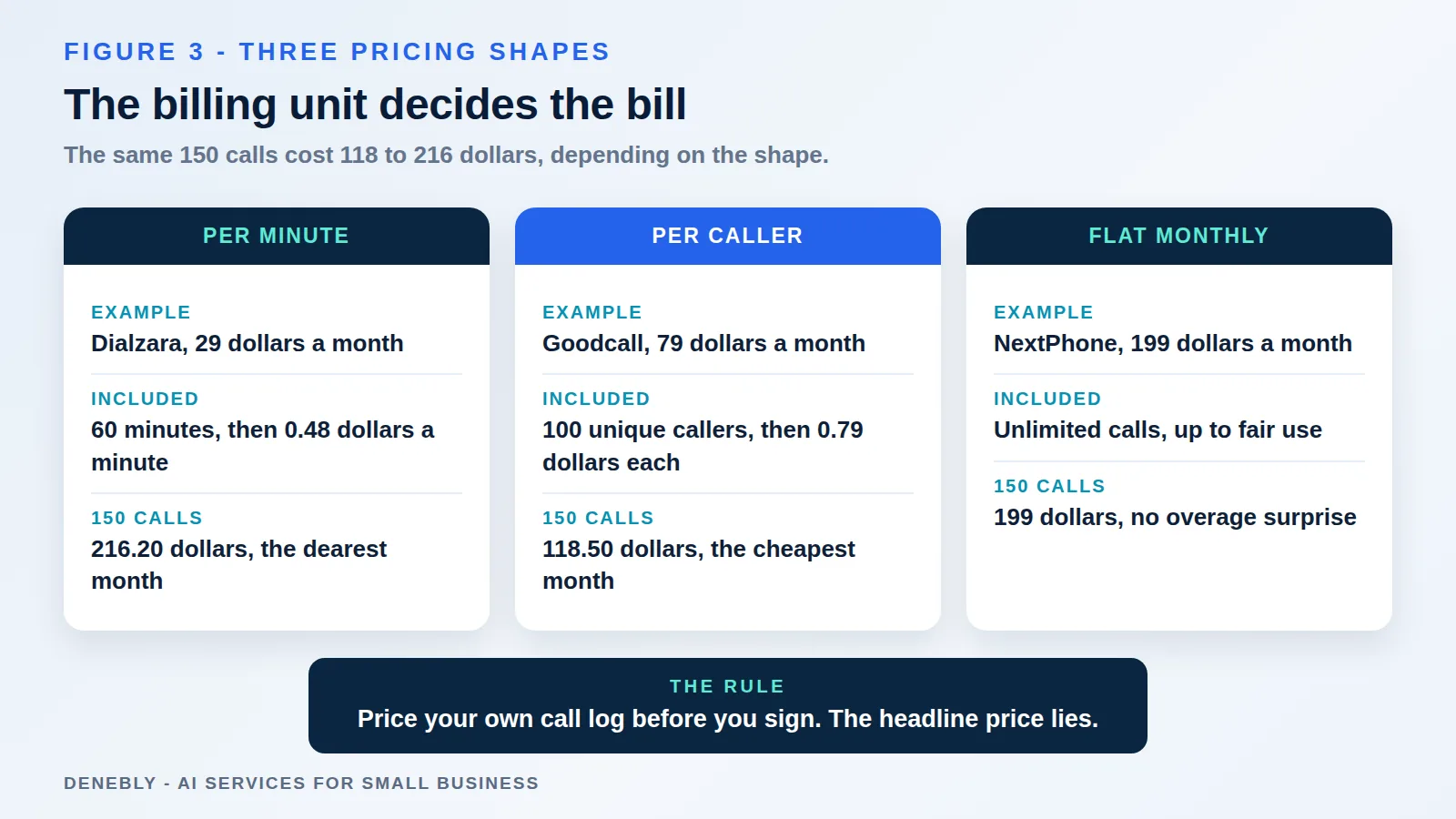
Vendors bill in three shapes, and the shape matters more than the headline price, because the same month of traffic can cost twice as much on the wrong shape.
Per minute, the common shape
You buy a bundle of minutes each month and pay an overage rate past it. Dialzara lists 29 dollars a month for 60 minutes, with 0.48 dollars a minute over, and Rosie lists 49 dollars for 250 minutes. This shape suits short calls and punishes long ones.
Per call or per caller
You pay for each call, or for each unique caller in the month. Goodcall lists 79 dollars a month for 100 unique callers, with 0.79 dollars for each caller past that, and Smith.ai lists a free plan for 25 calls, then Pro at 150 dollars a month.
Flat monthly, the simple shape
One price, calls included up to a fair use limit. NextPhone lists 199 dollars a month for unlimited calls, and Hyperleap lists 40 dollars a month for 3,000 replies on chat. Check the fair use line before you sign.
| Provider | Entry price | What it includes | Billing unit |
|---|---|---|---|
| Dialzara | 29 dollars a month | 60 minutes, 0.48 dollars a minute over | Per minute |
| Rosie | 49 dollars a month | 250 minutes | Per minute |
| Frontdesk | 99 dollars a month, 79 billed annually | 200 minutes, 0.25 dollars a minute over | Per minute |
| Goodcall | 79 dollars a month | 100 unique callers, 0.79 dollars each over | Per caller |
Prices are from vendor pages and November 2026 roundups read on 24 November 2026, and they change often, so confirm on the vendor pricing page the day you buy.
A worked month, what 150 calls cost on four plans
Take one fictional business and price it four ways. A salon takes 150 calls a month, three minutes each, which is 450 minutes of talk.
| Plan | Arithmetic | Monthly cost |
|---|---|---|
| Dialzara Business Lite | 29 dollars plus 390 minutes over at 0.48 dollars | 216.20 dollars |
| Rosie Scale | 450 minutes inside the allowance | 149 dollars |
| Frontdesk monthly | 99 dollars plus 250 minutes over at 0.25 dollars | 161.50 dollars |
| Goodcall Starter | 79 dollars plus 50 callers over at 0.79 dollars | 118.50 dollars |
The cheapest headline, 29 dollars, becomes the dearest month, 216.20 dollars, because the bundle is small and the overage is steep. Goodcall wins at 118.50 dollars, because it bills callers, not minutes.
Run the same sum with your own call log before you sign, calls, minutes and repeat callers, and price each plan on those three numbers.
If the booking flow behind the front desk needs building, our AI chatbot development work covers the calendar, the reminders and the records.
The break even sum against a person
Software looks dear until it is priced against a person. The US Bureau of Labor Statistics puts the median wage for receptionists at 18.27 dollars an hour, 38,010 dollars a year, in May 2025, wages alone, before payroll taxes and benefits.
A part time receptionist at 20 hours a week is 80 hours a month, which is 1,461.60 dollars a month in wages at 18.27 dollars an hour, and the phone still goes unanswered at night, at weekends and at lunch.
The same 150 calls cost 118.50 dollars on the cheapest plan above, and 199 dollars on the flat unlimited plan, which is 0.79 dollars per call against 9.74 dollars for the part time person, and the software also answers after hours calls.
BIA/Kelsey reported that 35 to 40 percent of calls to local businesses arrive outside 9 AM to 5 PM hours, which a person on a 20 hour week cannot cover at any wage.
How to set one up in a week
A front desk system goes live in a week when the work is ordered right, and the order below avoids the common failure, a system live with an empty library.
- Day 1, count the traffic. Pull one month of calls, chats and messages, and sort them by question.
- Day 2, write the answers, prices, hours, services, durations, policies and booking rules, in plain sentences.
- Day 3, connect the calendar and the records, with a test booking that lands in both.
- Day 4, write the handover list, the questions that go to a person and who gets the summary.
- Day 5, test it with real questions from your own inbox, including the awkward ones.
- Day 6, go live on one channel first, usually chat, and watch every conversation.
- Day 7, add the phone, then read the first week report.
Our guide on appointment automation covers the booking flow, the reminder timing and the no show handling behind the front desk.
The approved answers library, your safety file
The library is the whole safety story. The system answers only from it, so a wrong answer is a wrong line, and the fix is one edit.
Seven items belong in it before go live.
- Every service, with its price and its duration.
- Opening hours, including holidays and early closing days.
- How to book, reschedule and cancel, and any fees attached.
- What to bring to the visit, and what happens if the customer is late.
- Payment methods, deposits and refund rules.
- Who to route to, by name, topic and place.
- The questions it must never answer, and the handover line for each.
Review the library monthly, and after every price or policy change.
How to judge one before you pay, seven questions
Ask these seven before you sign. Each one catches a failure that a demo call never shows.
| Question | What it catches |
|---|---|
| What happens when it does not know the answer | A system that guesses instead of handing over |
| Which actions need my approval | A booking or a refund made without you |
| Is every action logged and replayable | A mistake with no record of how it happened |
| What is the billing unit, the cap and the overage rate | A 29 dollar plan that bills 216 dollars |
| Does it book into my live calendar | A booking that still needs a person to confirm it |
| Which channels are included in this plan | A phone plan that charges extra for chat |
| Can I take my library with me | A system that locks your own answers inside it |
OnceHub, in a 2026 pricing guide quoted by TeamShift, puts an AI receptionist at 300 to 3,600 dollars a year, a wide range because the products inside it differ so much.
Mistakes that waste the money
Most failed front desks fail the same ways.
- Going live with an empty library, then blaming the software for the guesses.
- Buying on the headline price without pricing your own call log on the billing unit.
- Forgetting the handover list, so angry callers argue with software that cannot decide.
- Never reading the weekly report, so the same three failures repeat for months.
Test with the questions that cost money when answered wrong, not the easy ones.
How Denebly builds one for a small business
Denebly builds this as part of its search and automation work for small and mid sized businesses, starting with a baseline week of one month of calls counted and the top 20 questions listed.
Then the build follows, the library written from your prices and policies, the calendar connected, the booking flow tested, and the phone live last, after chat has run clean for a week.
The same team runs the SEO services for small businesses work that brings the calls in.
The rule to work by
Write the answers once, approve them, connect the calendar, test with the awkward questions, and go live one channel at a time.
Spend the effort on the library and the handover list, where bookings are won and mistakes are made. That is the whole discipline of an ai front desk, and four weeks of it tells you more than any demo can.
If you would rather hand the build and the first month to a team, let us discuss your project. Write to sales@denebly.com or call +1 (214) 896-2906.
Frequently asked questions
What is an ai front desk
It is software that answers the first contact a business receives, on phone, chat, text and email, books visits into the live calendar, records the lead, and hands anything outside its approved answers to a person.
How much does front desk software cost each month
Entry plans run from 29 dollars a month to 199 dollars a month for unlimited calls. The real bill depends on your call volume and the billing unit, so price your own call log first.
Is an AI receptionist the same thing
Nearly. Receptionist stresses the phone and the greeting, while front desk stresses the whole entrance, every channel, the booking and the record. Most vendors sell one product under both names, so read the channel list, not the label.
Can it book appointments straight into my calendar
Yes, when the plan includes a calendar connection and the booking rules sit in the library. Cheaper plans only send a booking link, so ask which one the price covers.
What happens when it does not know the answer
A well built system stops, tells the customer a person will follow up, and sends your team a summary. If a system guesses instead, the library or the handover list needs fixing, not the model.
Will it replace my receptionist
It replaces the missed calls, the after hours gap and the voicemail backlog, not your team judgment. Routine questions move to software, and advice and unhappy customers stay with people.
Sources
- 411 Locals, small business call answer study, 85 businesses across 58 industries, as reported in 2026 missed call roundups.
- CallRail, small business benchmarks, January 2025, 1.1 million conversations, missed call rates by industry.
- Invoca, 2026 lead conversion benchmarks, more than 70 million calls, 56 percent of callers spoke with a person.
- BIA/Kelsey, calls outside business hours, 35 to 40 percent, as reported in the Zenop roundup.
- US Bureau of Labor Statistics, May 2025, median wage for receptionists, 18.27 dollars an hour, 38,010 dollars a year.
- Vendor pricing pages and November 2026 roundups for the four providers in the pricing table, read 24 November 2026.
- Denebly, Appointment Automation, our booking flow guide.

WRITTEN BY
Arslan Mushtaq
Founder, Denebly
Arslan founded Denebly in 2018 and leads its AI development work for startups and mid-size businesses, across AI chatbots, agentic workflows, RAG systems, machine learning and automation. Denebly has delivered 100+ projects from Dallas, Texas.
Ready to Solve Your Business Problems With AI?
Tell us what you are trying to build, automate or fix. You will get an honest assessment within one business day, not a sales pitch.