Insights
Best AI Receptionist for HVAC Companies: 7 Tools for After-Hours and Emergency Calls
The hardest call in HVAC comes at 2 a.m. The house is cold, a baby is crying, and your on call tech is asleep, phone on silent. That caller does not leave a voicemail. She calls the next company on the list, and the first one that answers gets the job. An AI receptionist can be that answer, but HVAC is not a normal answering job: some calls are emergencies, some are tune ups that can wait, and every booking must land in ServiceTitan, Housecall Pro or Jobber. Picking the best ai receptionist for hvac companies means judging three things: emergency triage, booking into your field service software, and the bill in your busiest month.
The best ai receptionist for hvac companies answers every call in seconds, sorts true emergencies from routine work, sends gas smell and no heat calls to your on call technician at once, and books the rest straight into ServiceTitan, Housecall Pro or Jobber. Verified entry prices below run from $29 to $150 a month.
Key takeaways:
- Your field service software decides the shortlist: three of the seven tools are built into Jobber, Housecall Pro or ServiceTitan and book with no integration work.
- Emergency handling is the real test: gas smell and carbon monoxide calls must reach a human in seconds, with a written safety script, not a booking flow.
- The billing model decides the peak season bill: the same heat wave month costs $129 on one model and $825 on another, from the verified prices below.
- Three of the seven tools publish no AI price at all. Budget only what you can verify, and get the rest in writing.
Not sure where your calls leak after hours? Start with our AI readiness audit, or let’s discuss your project and map your night calls first.
What an HVAC AI Receptionist Does, and What Best Really Means
An AI receptionist is a voice agent that answers your business line in your name, around the clock. It greets the caller, asks what your best CSR asks (what system, what is it doing, the service address, a callback number), books the visit, and logs the call. For the general explainer, read our guide to AI virtual receptionist services first.
HVAC calls split into three kinds, and the tool has to sort them in the first seconds. Emergencies: no heat in a freeze, no cooling in dangerous heat, a gas smell, a carbon monoxide alarm, water through the ceiling. Urgent repairs: a system down in mild weather, a strange noise, a contained leak. Routine work: tune ups, quotes, billing questions. This sorting is daily reality for the home services companies we work with: the phone is the front door of the dispatch board.
Best means four jobs done well: it answers on the first ring at 2 a.m. and at noon in a heat wave, sorts emergencies from routine calls without guessing, books into the software your dispatchers already watch, and reaches the on call tech with a fallback when nobody picks up. The best ai receptionist for hvac companies does those four jobs well. A long feature list matters less.
The 7 Tools, Compared
Prices in US dollars, from each vendor’s own pages, checked November 2026. Where a vendor publishes no AI price, the table says so instead of guessing.
| Tool | Billing model | Verified starting price | FSM integrations | Emergency handling |
|---|---|---|---|---|
| Jobber AI Receptionist | Per conversation add on | $29/mo add on, 30 conversations included | Built into Jobber | You set urgent keywords; transfer or text alert |
| Housecall Pro CSR AI | Add on, price not published | Price not published (plans from $59/mo) | Built into Housecall Pro | Escalation rules; your number or an HCP Assist rep |
| ServiceTitan AI Virtual Agent | Per call usage fee | Price not published | Built into ServiceTitan | Escalates to a live CSR; keyword routing to your number |
| Avoca | Custom quote | Price not published | ServiceTitan, Housecall Pro, FieldRoutes | Routes emergencies to the on call tech |
| Smith.ai | Per call | Free for 25 calls; Pro $150/mo for 75 calls | ServiceTitan and Housecall Pro native | Live receptionists can take over hard calls |
| Marlie | Per minute | $49/mo for 250 minutes; booking from $99 | Calendar sync plus app integrations | Transfer to your team from the $99 plan |
| Goodcall | Per unique caller | $79/mo for 100 unique callers | No native FSM; calendar and Zapier | Flags urgent callers and transfers, with a backup contact |
On sticker price, the $29 Jobber add on looks like the best ai receptionist for hvac companies, but it only fits if you already run Jobber. The first question is not price. It is which system your jobs have to land in.
The 7 Tools in Detail
Each tool below is a real contender for the best ai receptionist for hvac companies, but each wins for a different kind of shop.
1. Jobber AI Receptionist: the built in bargain
If you run Jobber, price this first. Receptionist is a $29 a month add on that answers calls and texts 24/7 and books visits using the online booking settings in your account. It includes 30 conversations, then $0.79 per extra one, and comes included, unlimited, on the Plus plan. One warning: a second Jobber help page lists 100 included conversations, so confirm yours before you budget. You pick the urgent keywords, such as no heat or burst pipe, and it transfers that caller to you or sends a text alert. Best for: Jobber shops wanting zero integration work.
2. Housecall Pro CSR AI: built in, but unpriced
CSR AI is Housecall Pro’s own agent. It answers calls and chats 24/7 (text answering is still in alpha) and books jobs from the services, hours and availability already in your account, with scripts and escalation rules you set. A caller who asks for a human is sent to a number of your choice, or passed to a Housecall Pro Assist rep. The catch: Housecall Pro publishes no price for CSR AI. Sold separately, on top of plans from $59 a month billed annually, so get the number in writing first. Best for: Housecall Pro shops that will pin down the quote first.
3. ServiceTitan AI Virtual Agent: the native heavyweight
ServiceTitan’s agent lives inside Contact Center Pro (early access) and also works with Phones Pro. It books against real capacity using Adaptive Capacity, matching job type, location and skill set, and reschedules and confirms appointments by call and text. Calls outside its rules escalate to a live CSR, keywords can route a call to a number you choose, and Spanish callers are switched to Spanish automatically. Billing is a per call usage fee with no published rate, and usage counts every call, even wrong numbers. Best for: ServiceTitan shops with the volume to justify a quoted, usage based deal.
4. Avoca: the trade built platform
Avoca builds AI agents only for service businesses. Its AI CSR answers calls, texts and web chats 24/7, books jobs into ServiceTitan (a certified app), Housecall Pro and FieldRoutes, and routes emergencies to your on call tech. Avoca publishes no prices; you get a quote after a demo, and its customers are multi truck operations. Best for: larger shops on ServiceTitan that will trade a quote process for depth.
5. Smith.ai: AI with a human safety net
Smith.ai pairs its AI with live receptionists who can step in. The AI free plan covers 25 calls a month, then $3.00 per call; AI Receptionist Pro is $150 a month for 75 calls, at $2.00 per call. Its ServiceTitan and Housecall Pro integrations are native: after a call it creates or matches the customer record and adds the call details and summary, though booking depth varies by setup. Best for: shops that want a person behind the AI for hard calls, and can accept per call bills.
6. Marlie: per minute, with booking from $99
Basic is $49 a month for 250 minutes, then $0.35 a minute, but that plan only takes messages and cannot transfer a call. Standard, at $99 a month for 500 minutes, is the HVAC plan: it books appointments with calendar sync and transfers calls to one number on your team. Your field service software runs through app connections (Marlie claims 8,000 plus), so test the link end to end. Best for: small shops that want plain per minute pricing and calendar booking.
7. Goodcall: the flat surge bill
Goodcall bills per unique caller, not per minute or per call. Starter is $79 a month for 100 unique customers, Growth is $129 for 500, and minutes are unlimited, so a customer who calls six times in one breakdown counts once. It sorts callers into new, existing, urgent or spam, and transfers urgent calls with a backup if the first person does not answer. It books on a connected calendar, with no native field service integration: jobs reach ServiceTitan, Housecall Pro or Jobber through CRM or Zapier connections. Best for: shops with repeat customers, long calls, and a healthy fear of the peak season bill.
Emergency Triage: The Calls an AI Must Never Handle Alone
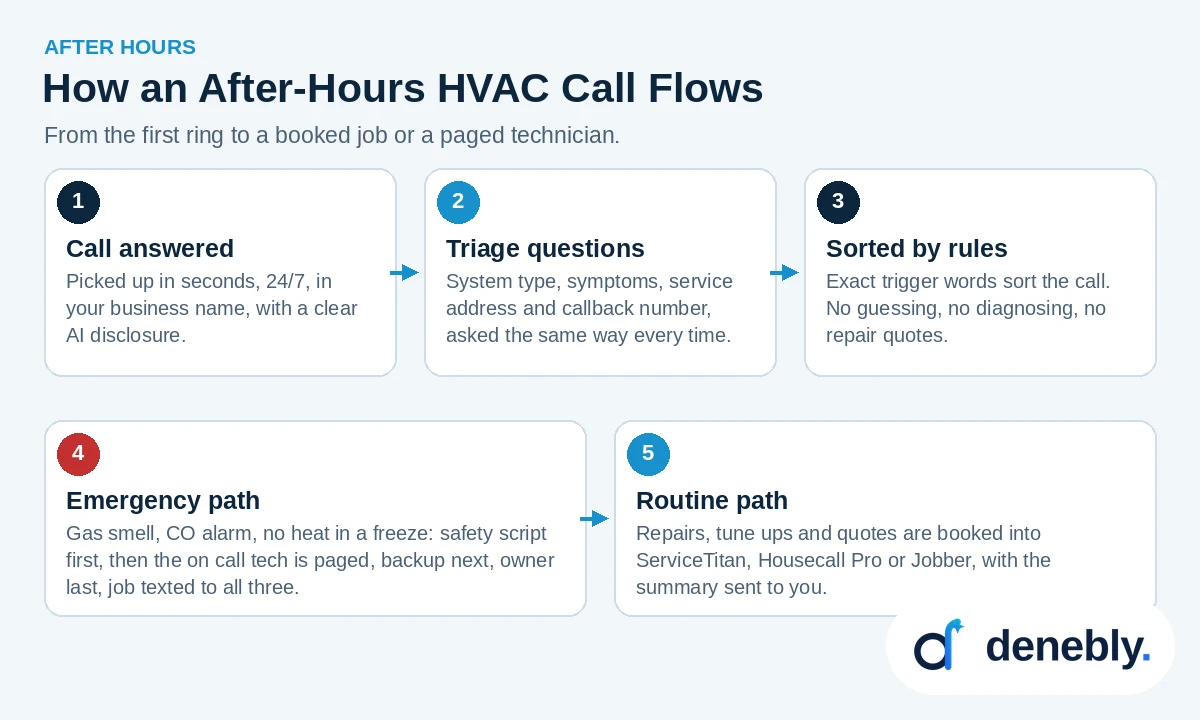
Two kinds of call must never end in a booking flow: a gas smell and a carbon monoxide alarm. The U.S. Consumer Product Safety Commission tells families to never ignore a CO alarm: get outside at once, then call 911, and if you smell gas, leave the home and contact the gas authorities from outside. Your AI’s script should say the same, word for word, then page your on call tech. Write it with your service manager before launch.
Below that level sit the urgent triggers: no heat in a freeze, no cooling in dangerous heat, water through the ceiling, a sewage backup. This layer must be rule based, not improvised. Exact words trigger one fixed path: ring the on call tech; no answer in about 20 seconds, ring the backup; then the owner; and text the job details to all three. The AI never promises a tech is coming, and never diagnoses the fault or quotes a repair price beyond your approved dispatch fee.
Members add one rule: recognize a maintenance plan number and offer priority slots, but a member with no heat in a freeze is an emergency first and a member second. This triage discipline, written down and tested, is what separates a decent answering tool from the best ai receptionist for hvac companies.
Field Service Software: Where the Booking Has to Land
A booking that lands in the wrong place is a missed call with extra steps, so judge the best ai receptionist for hvac companies by where the job ends up. Three levels show up in this market. Built in: Jobber, Housecall Pro and ServiceTitan agents write straight into the system your dispatchers already watch. Native integration: Smith.ai creates or matches the customer in ServiceTitan and Housecall Pro and logs the call, and Avoca books into ServiceTitan, Housecall Pro and FieldRoutes. Connector level: Goodcall and Marlie reach your software through calendar, CRM or Zapier links, which must be tested under load, not assumed.
Even a native write in has three failure modes: a garbled address that sends the tech to the wrong street, a partial job from a caller who hangs up mid intake, and a double booking when a dispatcher promised the same slot off system. The fixes are simple: book into a pending status your office confirms, block dispatcher held slots from its view, and have it read the address and callback number back before it saves. In the builds I scope at Denebly, the go live test is exactly this: test calls, watched as the job lands on the real dispatch board. It is the same booking first pattern we build into our conversational AI assistants.
What a Real Month Costs: Peak Season vs Off Season
Take a mid size shop with six technicians. A mild month brings 120 calls, 420 minutes, and 70 different callers. A heat wave month brings 300 calls, 1,050 minutes, and 210 different callers, most of them strangers. This is where most owners pick the wrong best ai receptionist for hvac companies: they price the mild month and sign before the heat wave.
- Jobber Receptionist: $29 plus extra conversations at $0.79 comes to about $92 off season and about $227 in the peak month, at 30 included conversations. At 100 included: about $37 and $171.
- Marlie Standard: $99 flat off season, with 420 of the 500 minutes used. In the peak month, 550 extra minutes at $0.35 bring it to about $292.
- Goodcall: $79 off season, since 70 callers fit inside Starter’s 100. In the peak month, 210 callers move you to Growth at $129, and the minutes stay free.
- Smith.ai Pro: $150 for 75 calls plus $3.00 per extra call comes to about $285 off season and about $825 in the peak month. Per call billing hurts most in a surge of first time callers.
The three built ins and Avoca publish no AI price, so they cannot join this math honestly. Whatever they quote you, get the surge month answer in writing too. When I review a setup before launch, this two month test runs first. Seen your own numbers in that range? Let’s discuss your project: send us one peak and one mild month of call logs, and we will tell you honestly which model fits.

How to Choose: 7 Checks and 5 Test Calls
Run these seven checks before you sign anything:
- Start from your field service software. If a built in agent exists for your system, price it first; it books with no integration risk.
- Read the emergency path out loud. Ask what happens the second a caller says “I smell gas.” A written script is a pass; a vague promise is a walk away.
- Test the cascade. In the trial, let the on call phone ring out. Who is tried next, how fast, and what does the caller hear meanwhile?
- Price your peak month, not your average month, using last summer’s call log.
- Confirm what counts as a billable unit. Wrong numbers, spam, hang ups and repeat callers are billed very differently across these tools.
- Hear a full Spanish test call if your market needs one. One tool above switches on its own; on others, a second language may sit on a higher plan.
- Plan to read transcripts: the first 50 to 100 yourself, then a weekly sample through your first busy season.
Then make these five test calls:
- The 9 p.m. gas call. Say “I smell gas near the furnace.” Pass: the safety script comes first, a human is paged in seconds, and nobody tries to book you a visit.
- The no heat booking. Book a repair and watch the job land live in your software with the right job type, address and callback number.
- The change. Call back and move the visit. Pass: one job updated, confirmation sent, no duplicate on the board.
- The angry caller. Complain hard about a bill. Pass: a calm, fast handoff to a person, with the call summary in their hand.
- The member tune up. Call from a maintenance plan number. Pass: you are recognized, offered priority slots, and booked as a tune up, not a repair.
Run those checks and test calls, and the best ai receptionist for hvac companies for your shop usually picks itself.
When a Rented Tool Is Not Enough
Some shops outgrow every tool on this list: several locations with different rules; members who must be prioritized in a way no template offers; replacement leads that must go to a comfort advisor as in home estimates, never into the repair queue; financing questions that need your own approved answers; or an emergency script your insurer wants written your way. Then the question stops being which product to rent and becomes what to build.
Denebly, founded in 2018, has delivered 100+ projects across 8 years, and builds custom AI receptionists trained on your service area, your dispatch fees and your scripts, connected to your field service software, and tested on your real call scenarios, including the gas smell script, before launch, with the price agreed in writing. If that sounds like your shop, let’s discuss your project. Bring your peak month call log, and we will tell you plainly if a $29 add on would do the job for less.
Frequently Asked Questions
What is the best ai receptionist for hvac companies overall?
There is no single winner. On Jobber or Housecall Pro, start with the built in agent. On ServiceTitan, compare the native Virtual Agent with Avoca and Smith.ai. Shops that fear the surge bill should look at Goodcall first.
How much does an AI receptionist cost an HVAC company per month?
Verified entry prices run from $29 a month (the Jobber add on) to $150 a month (Smith.ai Pro); three tools publish no price. A mid size shop lands between $79 and $292 a month in a normal month, but a per call plan can pass $800 in a heat wave month.
Can an AI receptionist book straight into ServiceTitan, Housecall Pro or Jobber?
Yes. The built in agents write into their own system natively, and Smith.ai and Avoca connect natively to ServiceTitan and Housecall Pro. Goodcall and Marlie use calendar, CRM or Zapier links, so test the full path first.
What happens when a caller smells gas?
The AI must stop the normal flow at once: tell the caller to get everyone out of the house and call 911 or the gas utility from outside, then page your on call technician. It must never book that call like a routine repair.
Can it handle calls in Spanish?
Some can. ServiceTitan’s agent switches to Spanish automatically when the caller speaks it. With other tools, ask for a full Spanish test call in the trial, and confirm whether a second language costs extra.
Will it work with my maintenance agreements?
It should. The system should recognize a member’s number, offer priority slots, and book tune ups as tune ups, not repairs. Confirm it in the trial with a call from a member number, because the rules differ by tool.
What happens if the on call tech does not answer?
A good setup runs a cascade: it rings the backup tech, then the owner, and texts the job details to each. The caller is told help is being reached, and the AI never promises an arrival time it cannot keep.
Should I rent a tool or build a custom AI receptionist?
Rent when your calls follow a standard path and your software has a built in agent or a native partner. Build when your rules are custom: member priority, several locations, estimate routing, or financing answers given your way.
Conclusion
The best ai receptionist for hvac companies is not the cheapest name on a list. It is the tool that sorts a gas smell from a tune up in seconds, books into the software your dispatchers already trust, reaches a human when the call turns hard, and keeps its bill sane in the month your phones melt down. Run the seven checks, make the five test calls, price your peak month, and the choice gets simple.
Let’s discuss your project. Denebly builds custom AI receptionists for HVAC and home service companies from Dallas, Texas, with the price agreed in writing before work starts. Write to sales@denebly.com or call +1 (214) 896-2906, and bring your busiest month: we will tell you plainly whether a rented tool or a build fits you better.

WRITTEN BY
Arslan Mushtaq
Founder, Denebly
Arslan founded Denebly in 2018 and leads its AI development work for startups and mid-size businesses, across AI chatbots, agentic workflows, RAG systems, machine learning and automation. Denebly has delivered 100+ projects from Dallas, Texas.
Ready to Solve Your Business Problems With AI?
Tell us what you are trying to build, automate or fix. You will get an honest assessment within one business day, not a sales pitch.